Kahoona vs ClickUp: a ClickUp alternative for GitHub teams
A ClickUp alternative built around GitHub, compared with ClickUp for small dev teams that use AI agents: pricing, pull requests, MCP and what clients see.
If you want a ClickUp alternative built around GitHub and AI coding agents, that's what I built Kahoona to be. If you want one tool for marketing, sales, HR and engineering, stay on ClickUp. It does a lot more than Kahoona, and it's meant to.
Kahoona is one board for a dev team and its AI agents. You drag a card to an agent and get a GitHub pull request back. Your team reviews it and merges it.
I make Kahoona, so weigh this with that in mind. Every ClickUp fact below links to ClickUp's own pages, checked October 26, 2026.
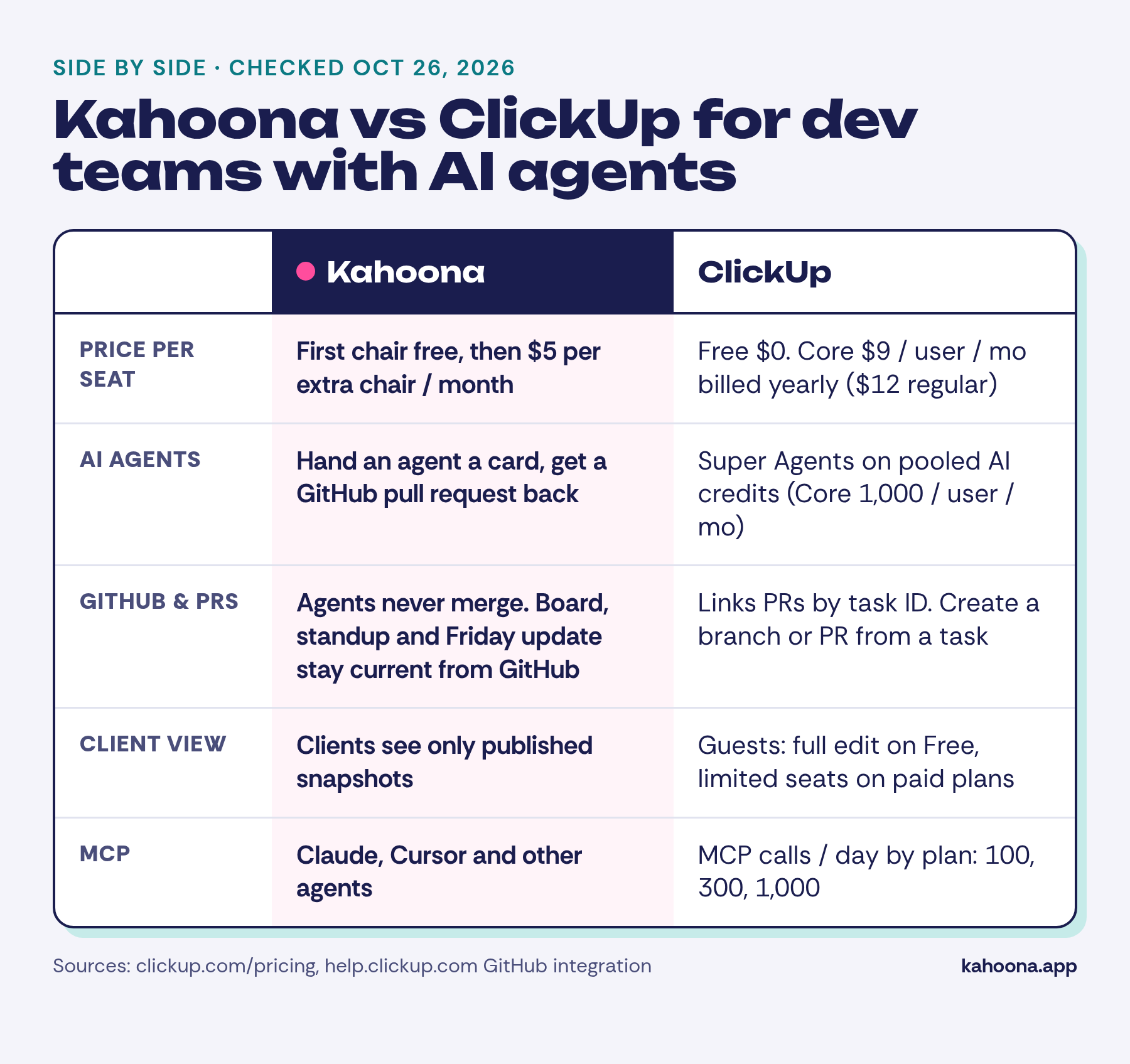
What Kahoona puts on one board
None of these is unique on its own. Plenty of tools have boards, GitHub links or AI. Kahoona puts them on one board:
- Agents work through pull requests and never merge. Hand an agent a card and it comes back as a GitHub PR. Your team reviews it and decides whether to merge. Agents follow your CLAUDE.md and WORKFLOW.md, so the rules live in your repo.
- The standup and Friday update stay current from GitHub. Nobody moves cards to "Done" or writes the weekly status from memory.
- Clients only see published snapshots. You publish an update to the Client Inbox and client pages. The live board, half-finished work and internal comments stay private.
- MCP access. Claude, Cursor and other agents connect to the board through MCP.
- $5 per chair, and free solo. No card needed to start.
Handing a task to an agent and getting a PR back aint rare any more. GitHub Copilot's cloud agent opens a pull request when you assign it an issue, then asks for your review (GitHub Docs). Linear lets you install agents and delegate issues to them (Linear Docs). What Kahoona adds is the rest of that list, on one board, at $5 a chair.
What each tool is built for
ClickUp wants to be the one place a whole company works. Its pricing page lists tasks, Docs, Chat, whiteboards, Gantt charts, forms, goals, time tracking, dashboards, automations and an AI layer called ClickUp Brain, with plans from Free up to Enterprise and Max. It's broad on purpose.
Kahoona is narrow on purpose. It's a board for engineering work where some of the workers are AI agents. A card is a unit of work. A pull request is how work comes back. GitHub is the source of truth for progress.
There's an Excalidraw whiteboard for sketching. Kahoona doesn't try to replace your docs or your chat.
AI agents
ClickUp's AI runs on credits. As listed on October 26, 2026, the Free plan includes 500 credits per workspace, Core 1,000 credits per user per month, Business 1,500 and Enterprise 3,000, all pooled. The Max plan includes 10,000.
Credits pay for Super Agents, AI Fields, AI automations and image generation. ClickUp also sells AI add-ons: Brain AI at $9 per user per month and Everything AI at $28 per user per month.
ClickUp's Super Agents can search connected GitHub files once you turn on External Search for GitHub (ClickUp Help). I didn't find ClickUp documentation describing its agents writing code into a pull request.
In Kahoona the agents are coding agents. You hand one a card. It works under the rules in your CLAUDE.md and WORKFLOW.md, then opens a pull request. It never merges. A person on your team reads the diff and decides, which is how it should be.
GitHub: the main reason to look for a ClickUp alternative
ClickUp's GitHub integration is solid, and it's on every plan (ClickUp Help):
- It links commits, branches and pull requests to a task when the task ID appears in the PR title, description, branch name or commit message.
- It creates GitHub issues, branches and pull requests from a task.
- It can update a task's status from a commit or PR using syntax such as
#ud5b[ready]. - It shows a Pull Requests column in List and Table views.
- GitHub Automations can react to events such as a merged pull request (ClickUp Help).
It works if your team is disciplined about putting task IDs into branch names and commit messages. If the ID is missing, nothing links.
Kahoona starts from GitHub instead of mapping back to it. The board, the daily standup and the Friday update stay current from GitHub activity, so the status you report matches what actually shipped.
Working with clients
ClickUp shares work with outside people through guests. Its pricing FAQ says guests on Free Forever get full create and edit permissions, and you can't change that. Paid plans start with a limited number of guest seats plus unlimited read-only guests. White labeling is listed on Enterprise and above.
Kahoona keeps clients off the live board. You publish a snapshot, and clients see it in the Client Inbox and on client pages. Work in progress stays private until you choose to share it.
Pricing and features side by side
Prices checked October 26, 2026. ClickUp figures are from clickup.com/pricing and its help centre. Kahoona figures are from kahoona.app.
| Kahoona | ClickUp | |
|---|---|---|
| AI agents | Hand an agent a card; it comes back as a GitHub PR | Super Agents and AI features paid for with pooled credits (Core 1,000/user/mo, Business 1,500) |
| Who merges code | Your team. Agents never merge | No ClickUp agent-written PRs found in its docs |
| Agent rules | CLAUDE.md and WORKFLOW.md in your repo | Not applicable |
| GitHub | Board, standup and Friday update stay current from GitHub | Links PRs, branches and commits by task ID; creates issues, branches and PRs from a task; GitHub Automations |
| MCP | MCP access for Claude, Cursor and other agents | MCP calls per day: Free 100, Core 300, Business 1,000, Enterprise 25,000, Max no daily cap |
| Client view | Published snapshots only, via Client Inbox and client pages | Guests: full edit on Free; limited guest seats plus read-only guests on paid plans |
| Whiteboard | Excalidraw whiteboard | Whiteboards: Free 3, Core 10, Business and above unlimited |
| Free plan | Free for a solo user | Free Forever, $0: unlimited free members, 60MB storage, 500 AI credits per workspace |
| Paid plans | First chair free, then $5 per extra chair per month, no card needed | Core $9/user/mo billed yearly ($12 regular); Business $17 billed yearly ($25 regular); Enterprise custom; Max $100 billed yearly ($120 regular) |
What five people would pay. This is our arithmetic from the published prices, not a quote. ClickUp Core for five users is 5 × $9 = $45 a month billed yearly, or 5 × $12 = $60 at the regular price. Kahoona keeps the first chair free and charges $5 a month for each extra chair, so five people is 4 × $5 = $20 a month.
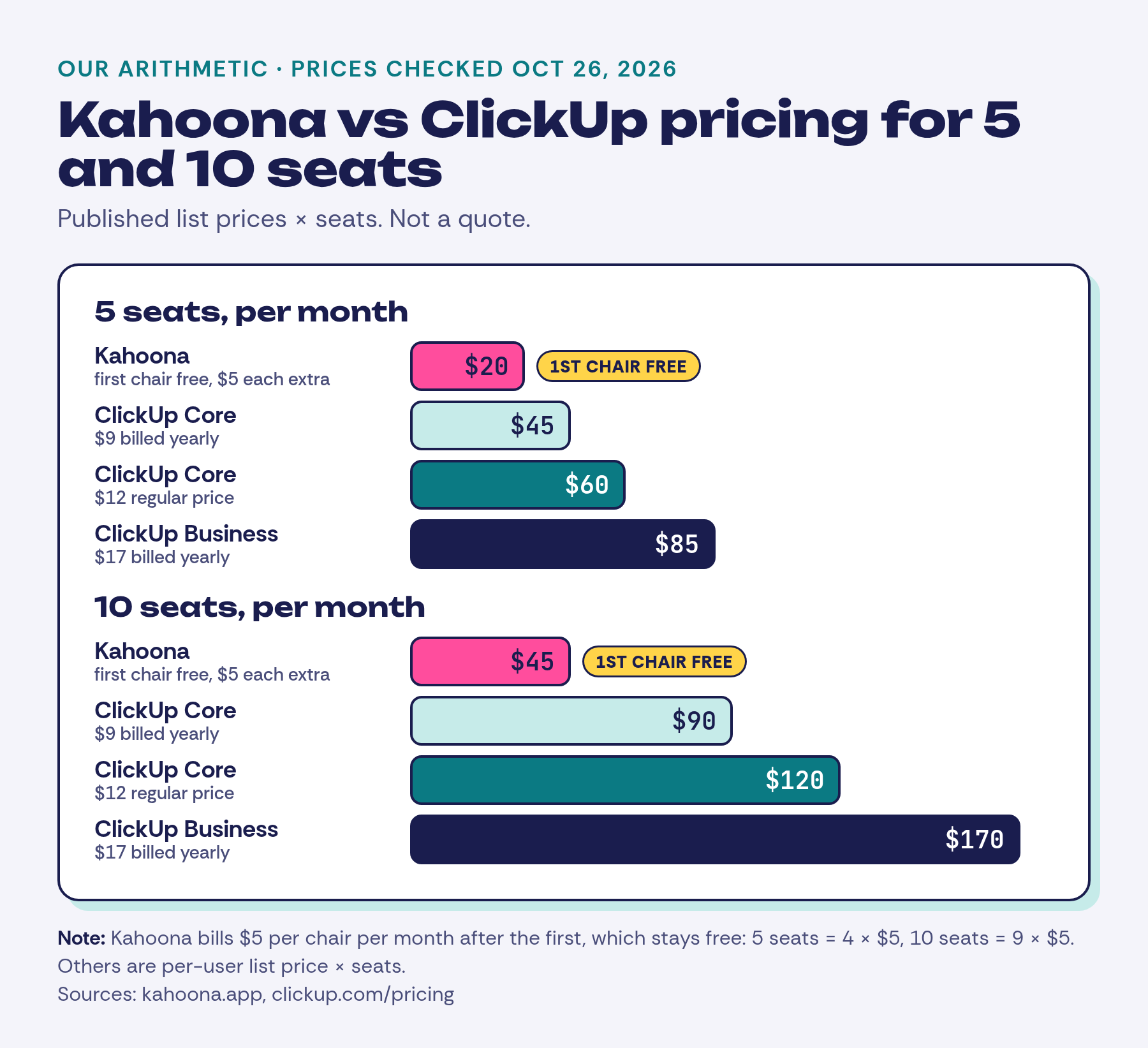
At ten people it's 9 × $5 = $45 a month on Kahoona, against $90 for ClickUp Core billed yearly. The free chair doesn't go away when the team starts paying.
When to pick ClickUp instead
Pick ClickUp if any of these sound like you:
- You need more than engineering. Marketing calendars, sales pipelines and HR onboarding all fit in ClickUp. Kahoona is for dev work only.
- You want docs, chat and planning in the same tool. ClickUp has Docs, Chat, Gantt charts, goals, time tracking and many views. Kahoona expects you to keep those elsewhere.
- You want AI for writing, summaries and automations, not code. ClickUp's AI credits cover a wide range of everyday tasks across the workspace.
- You rely on lots of integrations and deep customisation. Custom fields, custom task types, permissions and enterprise controls such as SSO, SCIM and audit logs are all listed on its plans.
- Your team already works well in ClickUp. Its GitHub integration may be all you need, especially with GitHub Copilot or another coding agent next to it.
How to try both fairly
Pick one real repo and one week. In ClickUp, connect GitHub, map the repo to a Space and work the way you normally do. In Kahoona, connect the same repo, add a CLAUDE.md and WORKFLOW.md, and hand a few small cards to an agent.
At the end of the week, compare how many status updates someone wrote by hand, how much review each pull request needed, and what you could safely show a client.
Also see: Kahoona vs GitHub Projects, Kahoona vs Trello, and ClickUp vs Trello vs Kahoona.