Kahoona vs GitHub Projects: a GitHub Projects alternative for AI agents
GitHub Projects vs Trello is the usual free-board question. Kahoona vs GitHub Projects on the card before a run, the pull request a person merges, and what clients see, checked 12 Nov 2026.
If you want a GitHub Projects alternative for AI agents, start with the pull request the team saw too late.
For a while the plan for a change lived only in my Claude Code chat. My teammates saw the work for the first time as a pull request, and that is where we found out we disagreed about the approach. By then the code existed and every comment meant rework.
What helped was moving the team's review to the plan. Before any code, the agent asks me clarifying questions with a recommended answer for each, until done is a short numbered list. That goes into a plan document in the repo, and a teammate can read it and answer open questions from their own agent before the build starts.
The build then runs in small slices with failing tests first. A separate agent that did not write the code checks each point of the list on the running program and shows evidence. When I review the finished change I read it against the list we agreed on, and nothing gets merged or pushed without my yes.
I built QualityLayer to run this loop on top of Claude Code, and I'm the developer: https://github.com/maxritter/qualitylayer
m-ritter, on r/ClaudeCode:
"My teammates saw the work for the first time as a pull request, and that is where we found out we disagreed about the approach. By then the code existed and every comment meant rework."
The plan had lived in his Claude Code chat. The rest of that post is a loop he runs, and a tool he ships. I have not tried the tool. That sentence is the one I am using. The disagreement showed up in the diff.
Code review is the new bottleneck. If an agent opens ten PRs before lunch, the scarce thing is a human who can tell which diff is safe to merge without reading every line.
Abbas Ali, the same morning:
"If an agent opens ten PRs before lunch, the scarce thing is a human who can tell which diff is safe to merge without reading every line."
Yup. Ten pull requests is not the scarce thing. A person who can say yes is. A board does not read the diff for you. Kahoona does not score one either.
GitHub Projects will list those pull requests, because the pull requests are the board. That is a real strength, and it is free with GitHub. The rest of this page is what that board does, what Kahoona does, and the plan-review step neither of them has.
I make Kahoona, so weigh this with that in mind. Every GitHub fact below is from GitHub's docs or github.com/pricing, checked 12 Nov 2026.
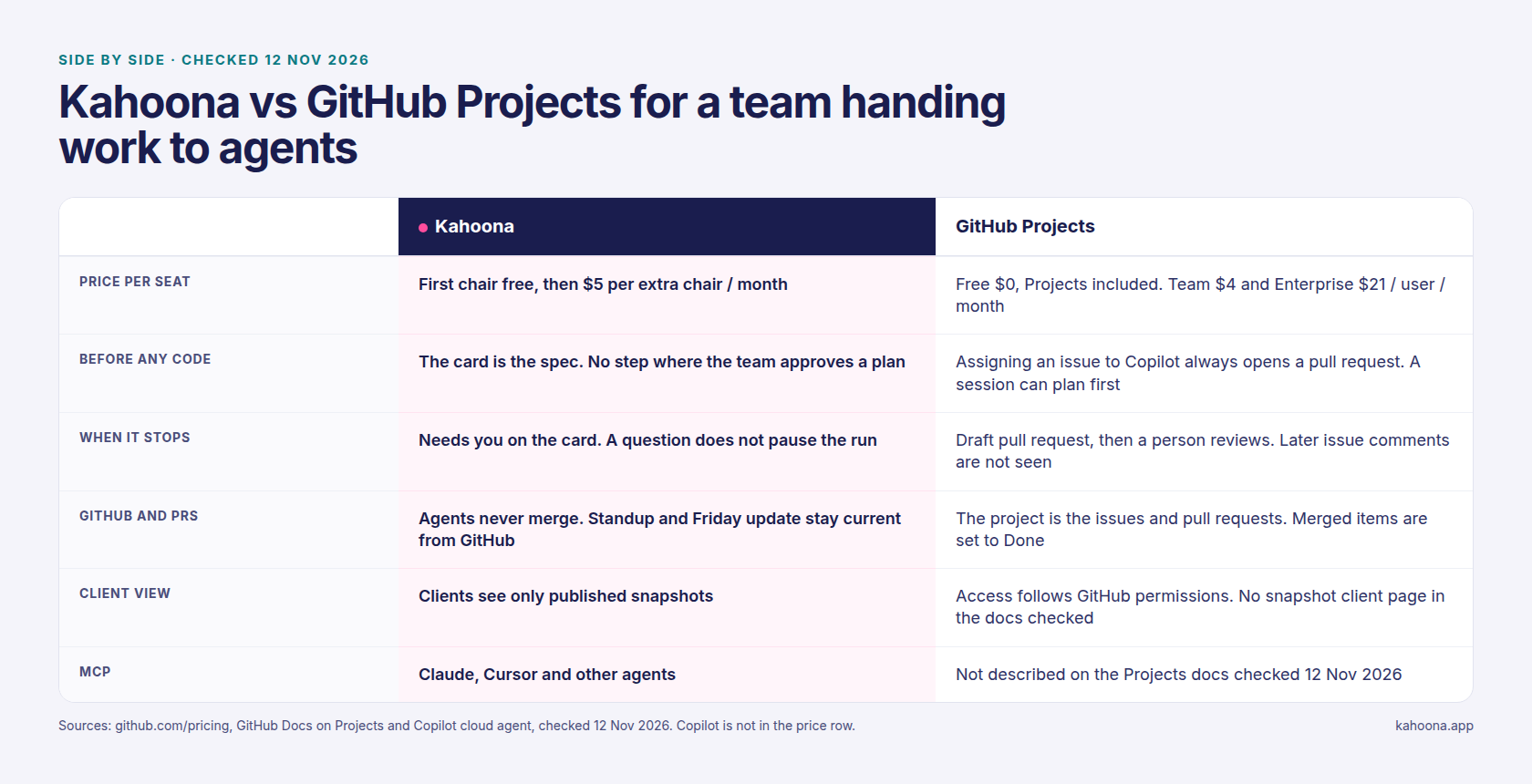
GitHub Projects vs Trello
People type GitHub Projects vs Trello when they want a free board. Trello is the general one. Cards and lists, and the work does not have to be code. I compared that board in Kahoona vs Trello. I have not rechecked Trello's prices today, so I am not repeating them here.
GitHub Projects is the board that is already your issues and pull requests. About Projects calls it an adaptable table, board, and roadmap, at the user or organization level. Change an assignee on the project and the issue changes. Change the issue and the project changes. You can save views, filter and group them, and lay them out as a table, a kanban board, or a roadmap. Custom fields cover a date, a number, a single select, a text note, and an iteration. A project can use up to 50 fields, built-in metadata included. Charts use the items you added. You can post a status such as On track or At risk, with a message, on the project.
Built-in workflows turn on two cases by default. When an issue or pull request in the project is closed, its status is set to Done. When a pull request in the project is merged, its status is set to Done. You can also archive items that match a filter, and add items from a repository when they match a filter. Auto-add is capped by plan: 1 on GitHub Free, 5 on Pro, 5 on Team, 20 on Enterprise Cloud, and 20 on Enterprise Server (Adding items automatically). A project can hold up to 50,000 items across the active views and the archive (Archiving items automatically).
On github.com/pricing, checked 12 Nov 2026, Projects is included on Free, Team, and Enterprise. The line on the page is tables, boards, and roadmaps with custom fields and views. Free is $0, with unlimited public and private repositories. Team is $4 per user per month. Enterprise is $21 per user per month. I did not see a separate yearly price on that page, so I am not inventing one.
If the work is issues and pull requests, and you want the board in GitHub, use Projects. Trello is the board when the work is not code. A GitHub Projects alternative only matters if you want the agent loop on the card.
What you get on the Kahoona card
Kahoona is one web board for a small team and its AI agents. You hand an agent a card. A code job comes back as a GitHub pull request. A person on the team reviews it and merges it. Agents never merge or deploy.
What is on the card before a run is the title, the description, and the comments. Assign a card whose description is under 60 characters and the card tells you to add what done looks like. That note does not block the run.
The agent reads the card and posts one sentence about what it is going to do. It does not wait for anyone to approve that sentence. You can switch the job between Code and Review until it delivers. Review reads the repo and replies on the card. It does not change the code. Code writes the branch, runs the checks, and opens the pull request. Switching a running Code job to Review stops that attempt and starts again as a review.
A question while it runs shows as Question for you. The agent is told to ask, then carry on with its best assumption and say which assumption it made. A reply on the card is handed to the running agent. The run does not stop for the answer.
Needs you is the chip when the run stops, with the reason, and the card comes back to the person who asked. If the checks still fail after two fixes, the pull request stays a draft and the card says Needs you. A run that gets through marks the pull request ready and moves the card to review, when the board has that column. A person merges. A project runs one of those cards at a time.
There is a spending limit on the card. The default in the code is $3. Past that, the next model call is refused and the agent is told to stop and summarize. It is a stop on spend, not a reading of the diff.
The standup groups the board by the person who owns the card. Shipped includes a merged pull request. Stuck is a blocker that is not finished, failing checks on an open or draft pull request, or a card waiting on the client. The Friday update is the weekly timeline on the GitHub tab. The counts are the GitHub activity already on the page. The paragraph is written the first time you expand that week.
Clients see a published snapshot in the Client Inbox and on client pages. A client reply lands in the Client Inbox and does not change the card. Live edits do not change a snapshot that is already out.
Claude, Cursor, and other agents connect over MCP. The agent you assign a card to has no membership, so it does not take a paid chair. A code job uses the repo's WORKFLOW.md when the repo has one. The runner is Claude Code. Kahoona writes the branch and opens the pull request. The agent is told not to commit, push, or create the branch.
Free for one person, no card. On a team the first chair stays free and each extra chair is $5 a month. Adding a paid chair asks for a card. Web app only.
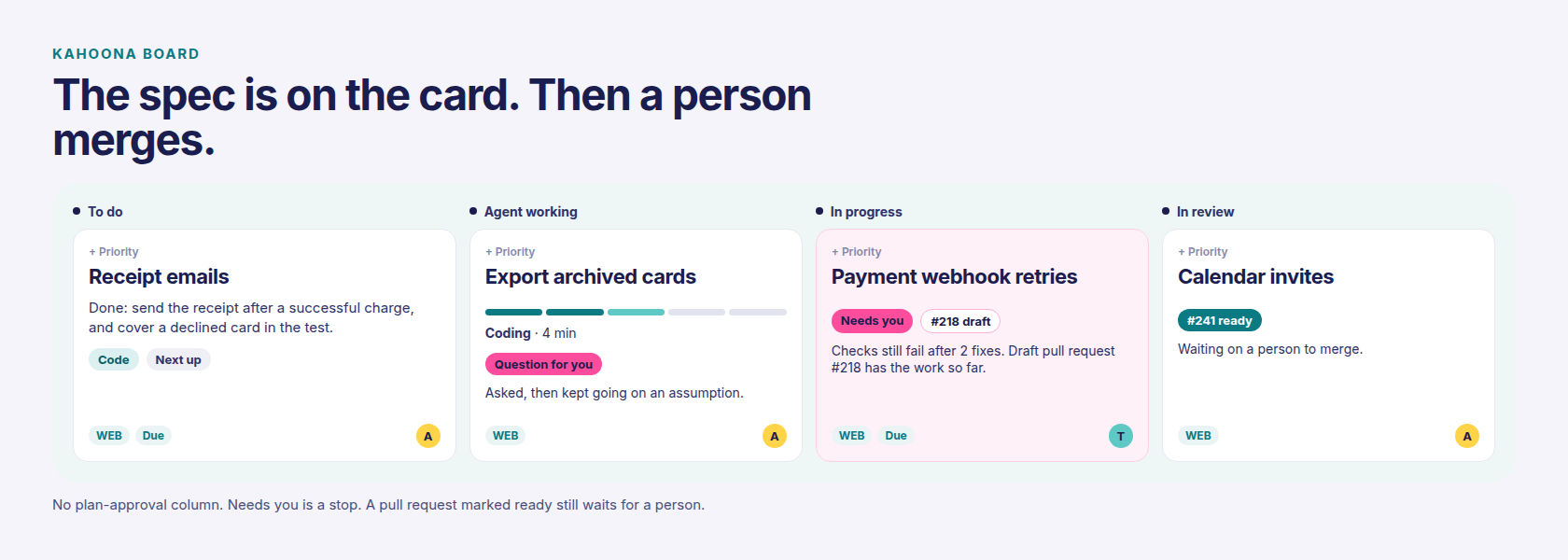
Who reviews those pull requests is the longer version in How to review AI agent pull requests without drowning. One owner on the card before a run is in A Claude Code kanban board. What an agent should decide on its own is in What coding agents should decide, and what they should ask you.
GitHub Projects for AI agents
GitHub Projects does not run the agent. Copilot does, and only on a paid Copilot plan. The troubleshooting page says Copilot shows up in Assignees when you have a paid Copilot plan, and an admin can turn the cloud agent off for a repository. The pricing page says GitHub Enterprise includes access to GitHub Copilot. I am not pricing Copilot credits. They are not in the bars below.
Assigning an issue always creates a pull request. Copilot gets the title, the description, and the comments that already exist. It does not see comments you add after that. Follow-ups go on the pull request. The troubleshooting page says it then opens a draft pull request. GitHub Actions workflows do not run on those pushes until someone clicks Approve and run workflows.
That is the r/ClaudeCode problem, on the board you already have. The team sees a pull request. The approach was not something they signed.
There is a plan step, and it is not on the project. Plan mode in the IDE researches the task and does not change code until you approve the plan. That approval is you, in the editor. You can save the plan as Markdown. The project does not grow an approved-plan column from that. A cloud session on github.com can research and plan before any pull request. Those sessions do not create a pull request until you ask. The plan stays in the session. The same page says other cloud-agent integrations, and it names Azure Boards, Jira, and Linear, only support creating a pull request directly.
If the team needs to argue the approach before code exists, write it where they will actually read it, before anyone starts a code job. GitHub Projects will not insert that meeting. Kahoona will not either. The card is where I put the approach, because the agent reads it, and a Review job can answer on the card without opening a pull request. Nobody has to click Approve plan. If that click is the product you want, this is the wrong board.
Linear is the other board people already use for this loop. If the questions are visible there, stay.
Pricing
Checked 12 Nov 2026.
Seat prices are the figures on github.com/pricing. Kahoona's price is the seat price in this repo, the same numbers as kahoona.app. First chair free, then $5 a month for each extra chair.
| Kahoona | GitHub Projects | |
|---|---|---|
| AI agents | Hand an agent a card. Review replies and changes nothing. Code comes back as a GitHub pull request. One running card at a time per project | The project is the issues and pull requests. Assigning an issue to Copilot always opens a pull request, on a paid Copilot plan |
| Before any code | Title, description, and comments. One sentence is posted, then the run starts. No approve-plan step | A cloud session can plan before you ask for a pull request. That plan stays in the session. Assigning an issue skips to a pull request |
| Waiting on a person | Needs you when the run stops, and the card comes back to the person who asked. Question for you does not pause the run | Copilot opens a draft pull request and asks for review. Comments added after assignment are not seen |
| Who merges | Your team. Agents never merge or deploy | A person reviews the pull request. I did not find a Projects setting that merges it for you |
| GitHub | Board, standup, and Friday update stay current from GitHub | The items are the issues and pull requests. Closed and merged items are set to Done by the default workflows |
| MCP | Claude, Cursor, and other agents | Not described on the Projects docs I checked |
| Client view | Published snapshots only, via Client Inbox and client pages | No published-snapshot client page in the docs I checked. Access follows GitHub permissions |
| Free plan | Free for one person, no card | Free, $0. Projects included. Unlimited public and private repositories |
| Paid plans | First chair free, then $5 per extra chair per month. A card is required to add a paid chair | Team $4 per user per month. Enterprise $21 per user per month. Copilot is separate, and Enterprise includes Copilot access |
What five people would pay. This is our arithmetic from the published prices, not a quote. GitHub Free for five people is $0, and Projects is included. GitHub Team is 5 × $4 = $20 a month. GitHub Enterprise is 5 × $21 = $105 a month. Kahoona keeps the first chair free and charges $5 for each extra chair, so five people is 4 × $5 = $20 a month.
At ten people, GitHub Free is still $0. Team is 10 × $4 = $40 a month. Enterprise is 10 × $21 = $210 a month. Kahoona is 9 × $5 = $45 a month.
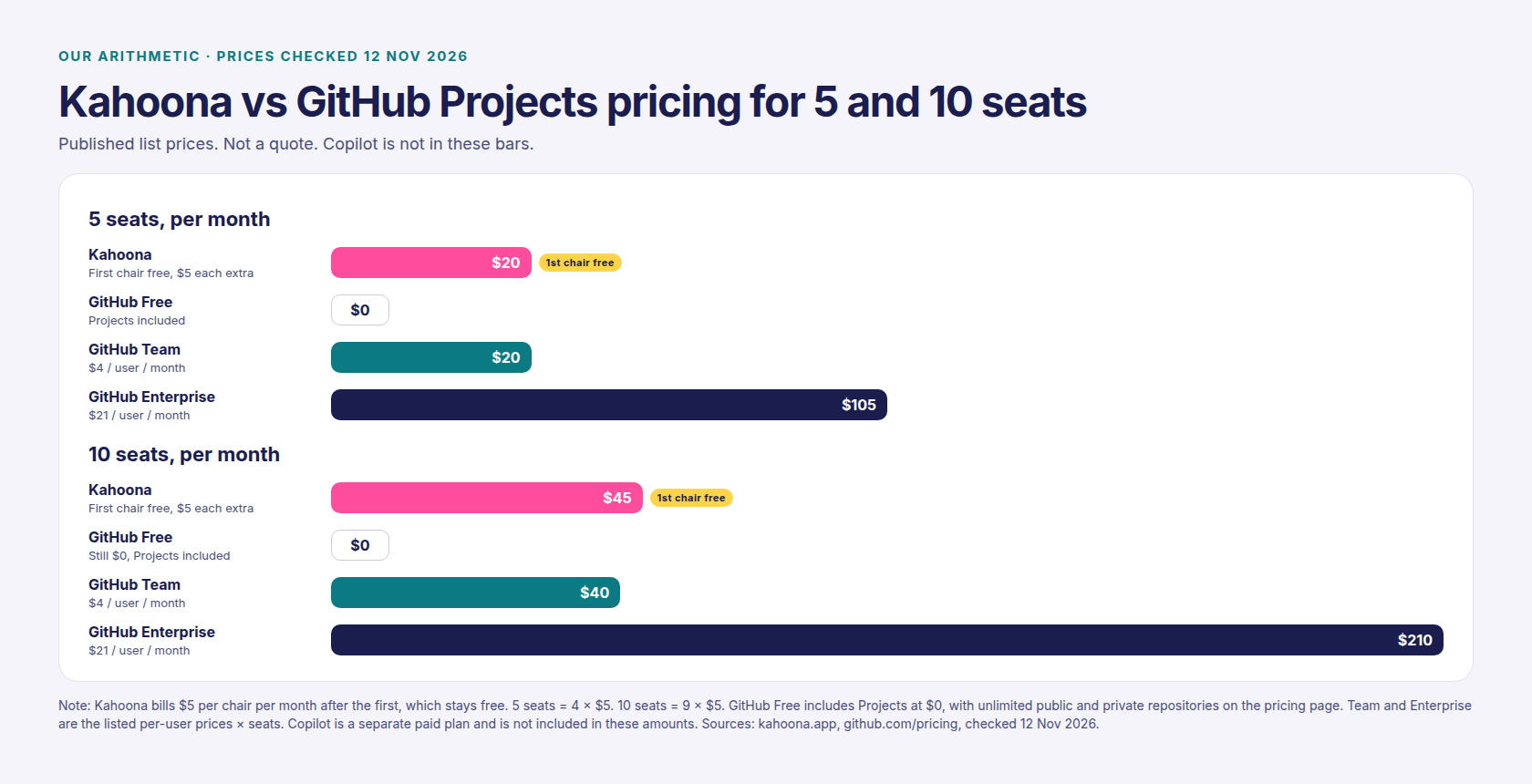
A $20 versus $0 gap is not why I would leave GitHub Projects. Free already has the board, next to the code. Kahoona is the wrong buy if nobody is handing cards to an agent.
When to pick GitHub Projects instead
Pick GitHub Projects if any of these are you:
- You want the board inside GitHub, for $0. Issues, pull requests, a table, a board, a roadmap, fields, charts, and a status you write. Kahoona is another product. It is a web app for a small team.
- The company already lives in issues, and Copilot is enough. Assign the issue, get a draft pull request, a person reviews. If that loop is working, I would not move them for a board.
- You want the plan approved by you, in the editor. Plan mode does that. A cloud session on github.com can plan before the pull request. The project is still the issues and the pull requests.
- You want teammates to sign the approach before any code exists. Neither board does that. Write the approach where the team will read it, before a code job starts. Kahoona's Question for you does not wait.
- The work is not code. That comparison is Kahoona vs Trello, not this one.
How to try both fairly
One repo, one week. In GitHub Projects, put the issues on a board. If you have a paid Copilot plan, assign one small issue and notice that the pull request is what shows up, and that a comment after assignment is not what Copilot reads. If you want a plan first, start a session from a prompt and do not ask for a pull request until you have read it.
In Kahoona, connect the same repo. Write what done looks like on the card before you hand it over. Use Review if you want a reply and no code. Use Code if you want the pull request.
At the end of the week, look at which disagreement showed up before a diff existed, who merged, and what a client was allowed to see.
Also see: Kahoona vs Trello, Kahoona vs Linear, How to review AI agent pull requests without drowning, and A Claude Code kanban board.