ClickUp vs Trello vs Kahoona for small dev teams
ClickUp vs Trello for small dev teams that ship code with AI agents, with Kahoona as a third option: prices checked October 26, 2026, GitHub links, MCP and client views.
Most ClickUp vs Trello articles compare them as general project tools. This one is for a small dev team that ships code, uses AI coding agents and usually reports to a client. That changes which differences matter.
I make Kahoona, so it's in here as the third column. Every ClickUp and Trello fact links to their own pages, checked October 26, 2026.
- Trello is the simple, flexible board. Pick it when the work isn't mainly code, or when you want a free board for up to 10 people.
- ClickUp is the all-in-one workspace. Pick it when several departments need docs, chat, planning and tasks in one tool.
- Kahoona is a board for a dev team and its AI agents. You drag a card to an agent and get a GitHub pull request back.
What Kahoona puts on one board
None of these ideas is unique on its own. The difference is having all of them on one board:
- Agents work through pull requests and never merge. An agent takes a card, follows your CLAUDE.md and WORKFLOW.md, and opens a GitHub PR. Your team reviews and merges it.
- The standup and Friday update stay current from GitHub. Status comes from commits and PRs, not from someone remembering to drag cards.
- Clients only see published snapshots, through the Client Inbox and client pages.
- MCP access for Claude, Cursor and other agents.
- $5 per chair and free solo, no card needed.
Task to PR is available elsewhere too. GitHub Copilot's cloud agent always creates a pull request when you assign it an issue (GitHub Docs). Linear lets you delegate issues to installed agents (Linear Docs).
As of October 26, 2026, I didn't find ClickUp or Trello documenting their own agents writing code into PRs. You can pair either one with Copilot, though.
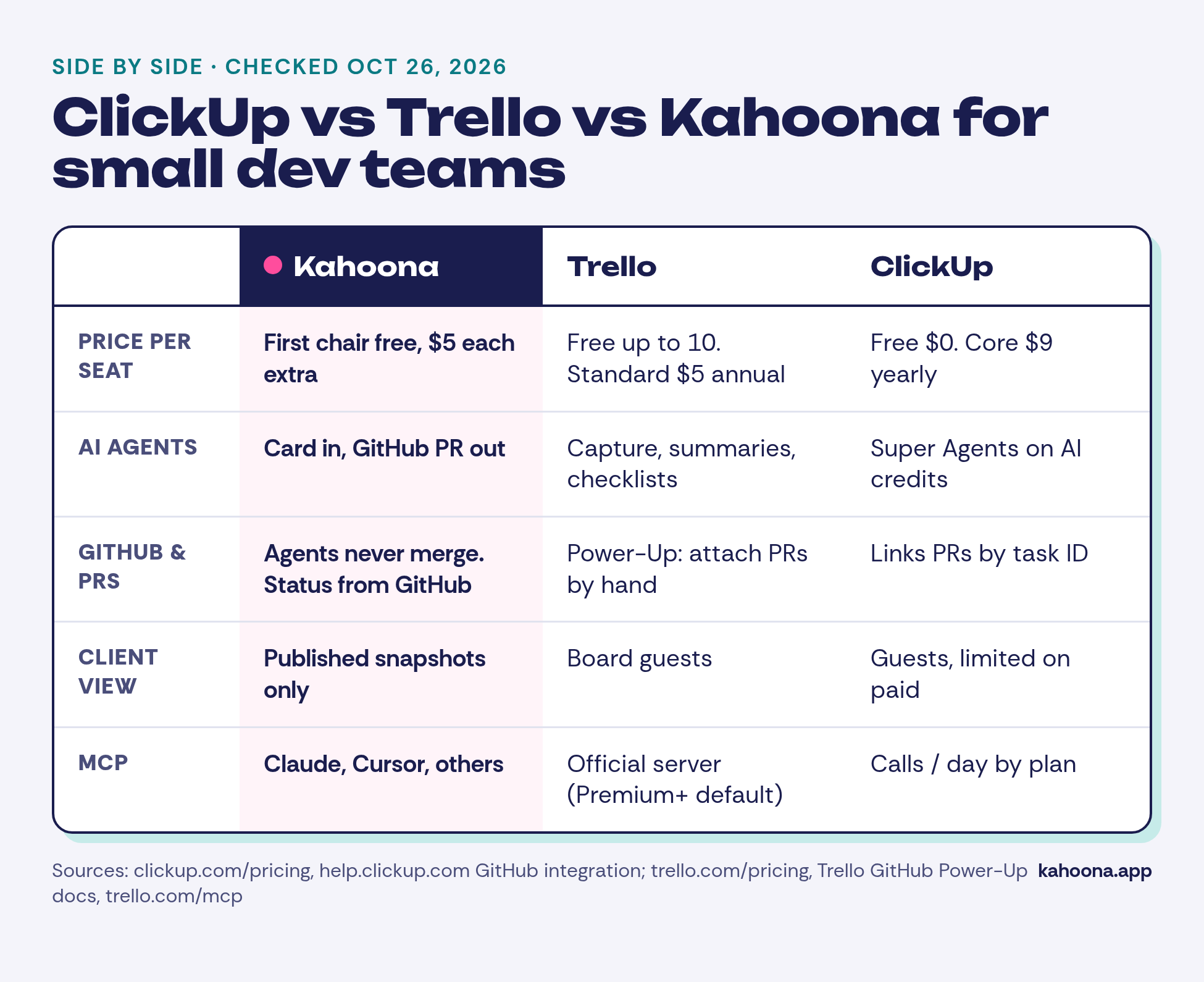
ClickUp vs Trello vs Kahoona: the table
Prices checked October 26, 2026 from each vendor's official pages. Kahoona figures are from kahoona.app.
| Kahoona | Trello | ClickUp | |
|---|---|---|---|
| Built for | Dev teams working with AI agents | Any team that wants a simple board | Whole organisations in one workspace |
| AI | Agents take a card and return a GitHub PR | AI capture, summaries, checklists and board generation | Super Agents and AI features on pooled credits (Core 1,000/user/mo) |
| Who merges code | Your team. Agents never merge | Not applicable | Not applicable |
| GitHub | Board, standup and Friday update stay current from GitHub | GitHub Power-Up: attach branches, commits, issues and PRs to cards by hand | Links PRs, branches and commits by task ID; creates issues, branches and PRs from a task |
| MCP | MCP access for Claude, Cursor and others | Official MCP server, on by default for Premium and Enterprise | MCP calls per day by plan: Free 100, Core 300, Business 1,000 |
| Clients | Published snapshots via Client Inbox and client pages | Guests; multi-board guests billed as members | Guests; full edit on Free, limited seats plus read-only guests on paid plans |
| Whiteboard | Excalidraw whiteboard | Not listed on the pricing page | Whiteboards: Free 3, Core 10, Business+ unlimited |
| Free plan | Free for a solo user | $0, up to 10 collaborators and 10 boards per Workspace | Free Forever $0: unlimited free members, 60MB storage |
| Entry paid plan | First chair free, then $5 per extra chair per month, no card needed | Standard $5/user/mo billed annually ($6 monthly) | Core $9/user/mo billed yearly ($12 regular) |
| Next tier | n/a | Premium $10 billed annually ($12.50 monthly) | Business $17 billed yearly ($25 regular) |
Sources: ClickUp pricing, ClickUp GitHub integration, Trello pricing, Trello GitHub Power-Up, Trello MCP.
How each handles the dev loop
Planning a piece of work. All three give you cards or tasks on a board. ClickUp adds many more views and fields. Trello Premium adds Calendar, Timeline, Table, Dashboard and Map views. Kahoona sticks to the board and a whiteboard.
Getting the code written. In Trello and ClickUp, a person or a separate coding agent writes the code, and the tool links to the result. In Kahoona, you hand the card to an agent and the result comes back as a pull request on the board.
Keeping status honest.
- Trello relies on people attaching GitHub items and moving cards.
- ClickUp links activity automatically when task IDs appear in branches, commits or PR text, and can change a status with syntax such as
#ud5b[ready]. - Kahoona keeps the board, the standup and the Friday update current from GitHub.
Reviewing and merging. In every case the merge happens in GitHub. Kahoona makes it a rule: agents never merge, and a person on your team always decides.
Telling the client. Trello and ClickUp bring clients in as guests, so you manage what they can see in a live workspace. Kahoona publishes snapshots to a Client Inbox and client pages, and the live board stays internal.
What five people would pay
This is our arithmetic from the published prices, not a quote:
- Trello Standard: 5 × $5 = $25 a month billed annually, or 5 × $6 = $30 monthly. Trello Free costs $0 for up to 10 collaborators, with limits.
- ClickUp Core: 5 × $9 = $45 a month billed yearly, or 5 × $12 = $60 at the regular price. Free Forever costs $0, with limits such as 60MB of storage.
- Kahoona: the first chair stays free and each extra chair is $5 a month, so 4 × $5 = $20 a month.
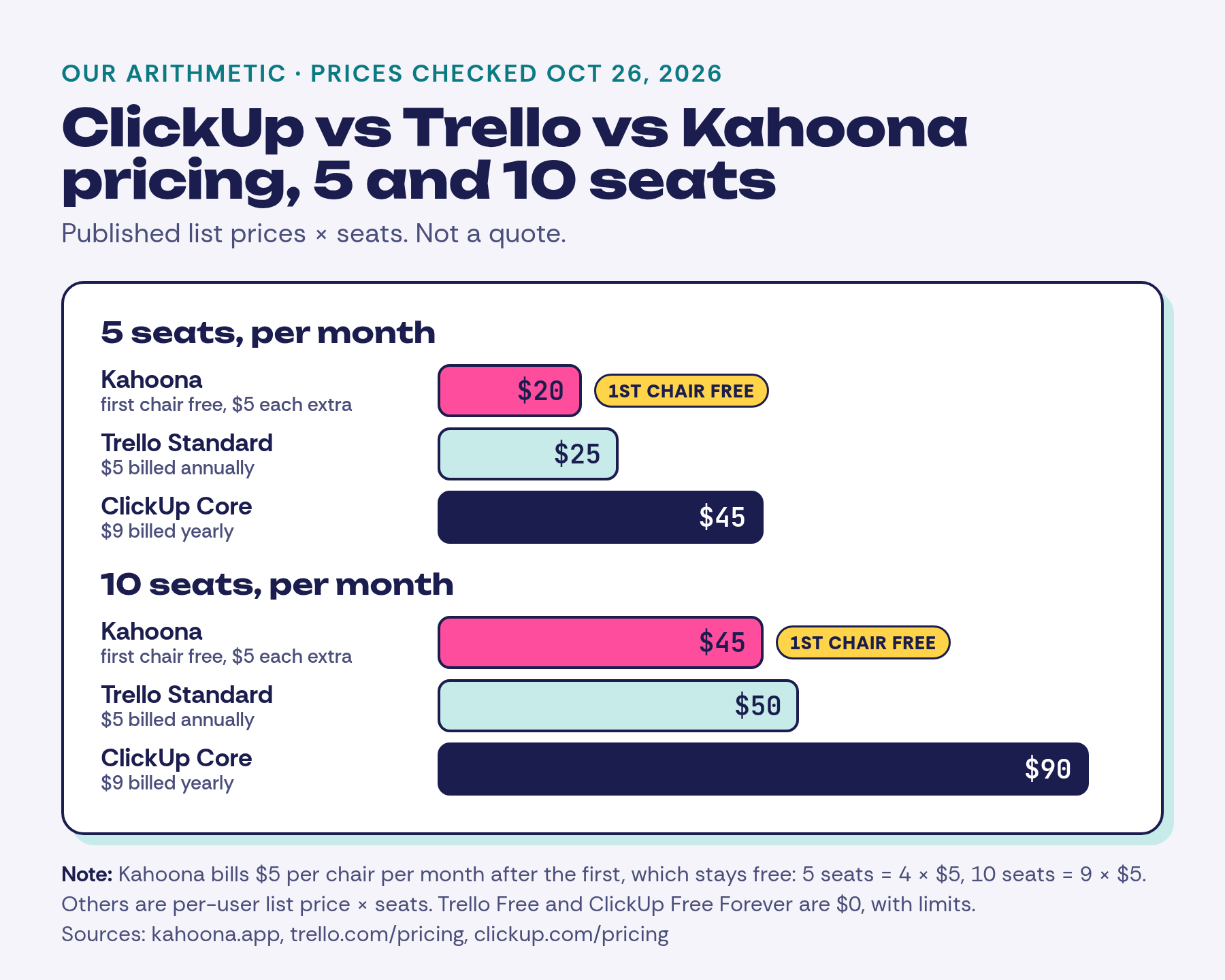
At ten people it's $45 a month on Kahoona (9 × $5), $50 on Trello Standard billed annually and $90 on ClickUp Core billed yearly. The free plans are still cheaper if their limits fit you.
When Trello is the right pick
- Your board covers more than code: content, hiring, events or personal tasks.
- You want a free board for a small group. Trello Free allows up to 10 collaborators per Workspace.
- You like to customise with Power-Ups, which are unlimited per board even on Free.
- You want calendar, timeline and map views (Premium).
When ClickUp is the right pick
- Several departments need to work in one tool.
- You want docs, chat, Gantt charts, goals and time tracking next to your tasks.
- You want a deeper GitHub integration that creates branches and PRs from a task and automates on GitHub events.
- You need enterprise controls such as SSO, SCIM and audit logs, which are listed on higher plans.
When Kahoona is the right pick
- Your team mostly ships code and already uses Claude, Cursor or other agents.
- You want agents to work through pull requests, with people always making the merge call.
- You're done writing standups and Friday updates by hand.
- You report to clients and want them to see a curated snapshot, not your live board.
Where both Trello and ClickUp beat Kahoona
Breadth and maturity. Both have far wider feature sets, many more views and big integration ecosystems. They also suit non-engineering teams, which Kahoona aint built for.
Trello's free plan covers a small group, while Kahoona's covers one person. If your team doesn't use AI agents, most of what makes Kahoona different won't matter to you.
The one-on-one comparisons: Kahoona vs ClickUp, Kahoona vs Trello, and Kahoona vs GitHub Projects.