Kahoona vs Trello: a Trello alternative for teams that ship code
A Trello alternative for teams that ship code with AI agents. Kahoona vs Trello on pricing, GitHub, pull requests, MCP and what clients see, checked October 2026.
Trello is a good board for almost any kind of work. If you want a Trello alternative for teams that write code with AI coding agents, Kahoona is built for exactly that and not much else.
In Kahoona you hand an agent a card and it comes back as a GitHub pull request. Your team reviews it and merges it.
I make Kahoona, so keep that in mind. Every Trello fact below links to Trello or Atlassian pages, checked October 26, 2026.
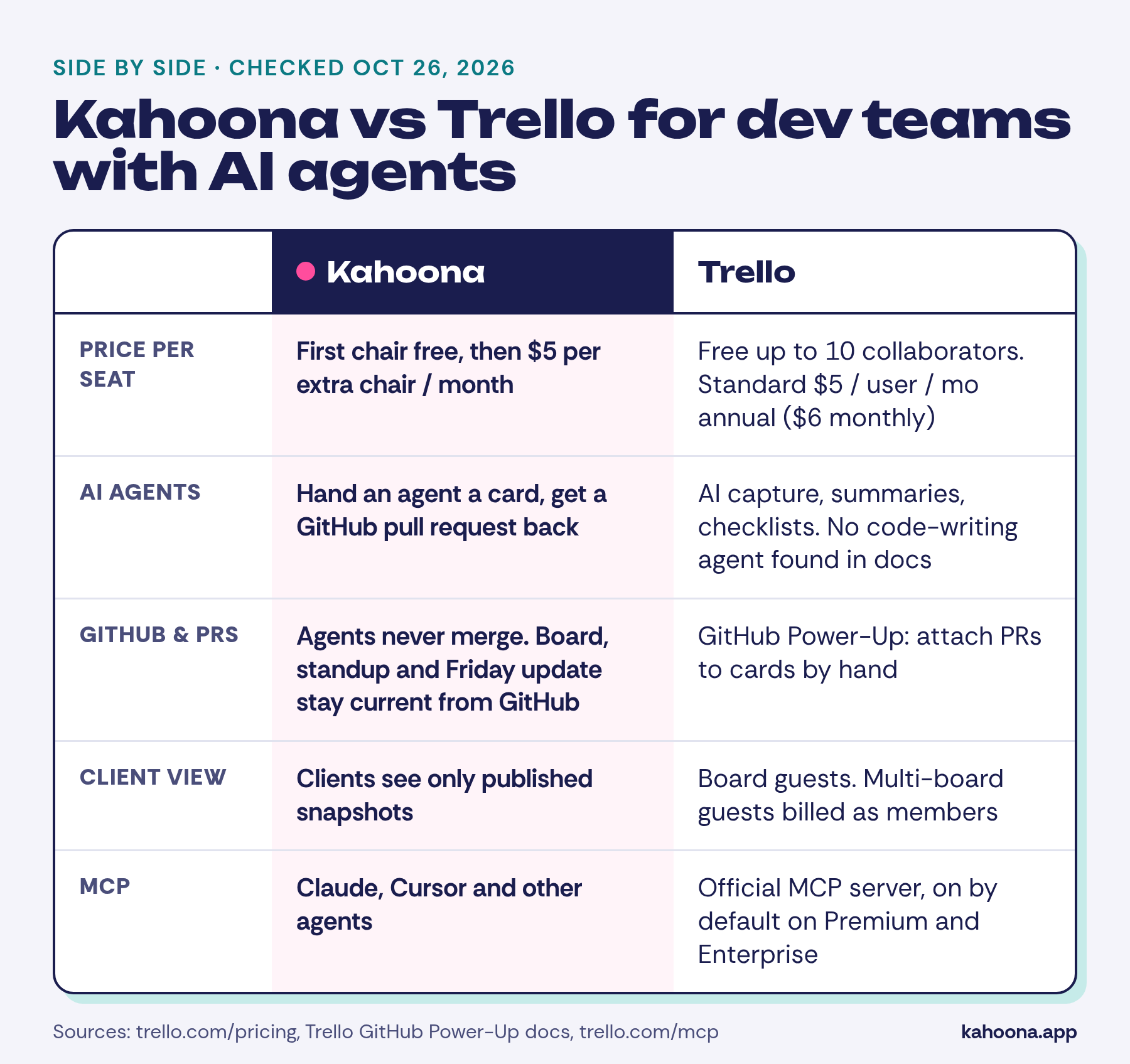
Why Kahoona works as a Trello alternative for teams that write code
Each of these exists somewhere else. Kahoona puts them on one board:
- Agents work through pull requests and never merge. An agent takes a card, works under your CLAUDE.md and WORKFLOW.md, and opens a GitHub PR. A person on your team reviews and merges it.
- The standup and Friday update stay current from GitHub. Progress comes from real commits and PRs, not from someone remembering to drag cards.
- Clients only see published snapshots. They get the Client Inbox and client pages, never the live board.
- MCP access. Claude, Cursor and other agents connect through MCP.
- $5 per chair and free solo. No card needed.
Getting a PR back from an assigned task isn't unique any more. GitHub Copilot's cloud agent always creates a pull request when you assign it an issue, then requests your review (GitHub Docs). Some Trello teams already pair the board with Copilot. The difference is that Kahoona's board is built around that loop.
What each tool is built for
Trello is a general-purpose board. Cards, lists, checklists, due dates and Power-Ups let teams in marketing, product, engineering, design or HR shape it to fit.
Paid plans add AI features, card mirroring, custom fields and, on Premium, extra views such as Calendar, Timeline, Table, Dashboard and Map (Trello pricing).
Kahoona is opinionated. A card is engineering work. Some cards go to people, some to AI agents. A pull request is how agent work comes back, and GitHub tells the board what actually happened. There's also an Excalidraw whiteboard for sketching ideas.
AI agents
Trello's AI, per its pricing page, captures to-dos from email, Slack and Teams, summarises and improves card text, generates checklists and images, adds due dates, merges cards and generates whole boards from a goal. They're useful for organising work. I didn't find Trello documentation describing an agent that writes code into a pull request.
Trello also has an official MCP server, so AI tools can read and update boards (Trello MCP). Its FAQ says the MCP can't permanently delete boards, lists or cards, and access is on by default for Premium and Enterprise.
So you can wire a coding agent up to Trello yourself. You'd still have to build the loop that turns a card into a PR and keeps the board in sync. Tbh that's the hard part.
In Kahoona that loop is the product. You hand a card to an agent. It follows the rules in your repo's CLAUDE.md and WORKFLOW.md, opens a pull request, and stops there. Agents never merge.
GitHub
Trello connects to GitHub through the GitHub Power-Up (Atlassian Support). You attach a branch, commit, issue or pull request to a card, and attached PRs show useful details on the card.
When you attach a PR, issue or commit, Trello posts a comment on it in GitHub linking back to the card. You can switch that off. According to Atlassian, that comment is the only time the Power-Up writes back to GitHub.
So the Power-Up is about linking, and the linking is manual. Someone has to attach the GitHub item to the card.
Kahoona reads from GitHub continuously. The board, the daily standup and the Friday update stay current from GitHub activity, so nobody attaches links or updates statuses by hand.
Working with clients
Trello shares boards through guests. Per its pricing page, Standard includes single-board guests, and any guest on more than one board in a Workspace counts as a multi-board guest, billed at the same rate as a member. Premium adds Observers, a setting that limits what a user can do on a board.
Kahoona doesn't put clients on the board at all. You publish a snapshot, and clients read it in the Client Inbox and on client pages. Internal cards, agent PRs in progress and team comments stay private.
Pricing and features side by side
Prices checked October 26, 2026. Trello figures are from trello.com/pricing, the GitHub Power-Up docs and trello.com/mcp. Kahoona figures are from kahoona.app.
| Kahoona | Trello | |
|---|---|---|
| AI | Agents take a card and return a GitHub PR | AI capture, summaries, checklists, due dates and board generation on Standard and above |
| Who merges code | Your team. Agents never merge | No Trello agent-written PRs found in its docs |
| Agent rules | CLAUDE.md and WORKFLOW.md in your repo | Not applicable |
| GitHub | Board, standup and Friday update stay current from GitHub | GitHub Power-Up: manually attach branches, commits, issues and PRs to cards |
| MCP | MCP access for Claude, Cursor and other agents | Official MCP server; enabled by default on Premium and Enterprise |
| Client view | Published snapshots only, via Client Inbox and client pages | Board guests; multi-board guests billed as members; Observers on Premium |
| Views | Board, plus an Excalidraw whiteboard | Board on all plans; Calendar, Timeline, Table, Dashboard and Map on Premium |
| Free plan | Free for a solo user | Free, $0: up to 10 collaborators per Workspace, up to 10 boards per Workspace, unlimited Power-Ups per board |
| Paid plans | First chair free, then $5 per extra chair per month, no card needed | Standard $5/user/mo billed annually ($6 monthly); Premium $10 billed annually ($12.50 monthly); Enterprise $17.50 billed annually |
What five people would pay. This is our arithmetic from the published prices, not a quote. Trello Standard for five users is 5 × $5 = $25 a month billed annually, or 5 × $6 = $30 billed monthly. Kahoona keeps the first chair free and charges $5 a month for each extra chair, so five people is 4 × $5 = $20 a month.
At ten people it's 9 × $5 = $45 a month on Kahoona and $50 on Trello Standard billed annually. A $5 gap aint what decides it. The workflow is.
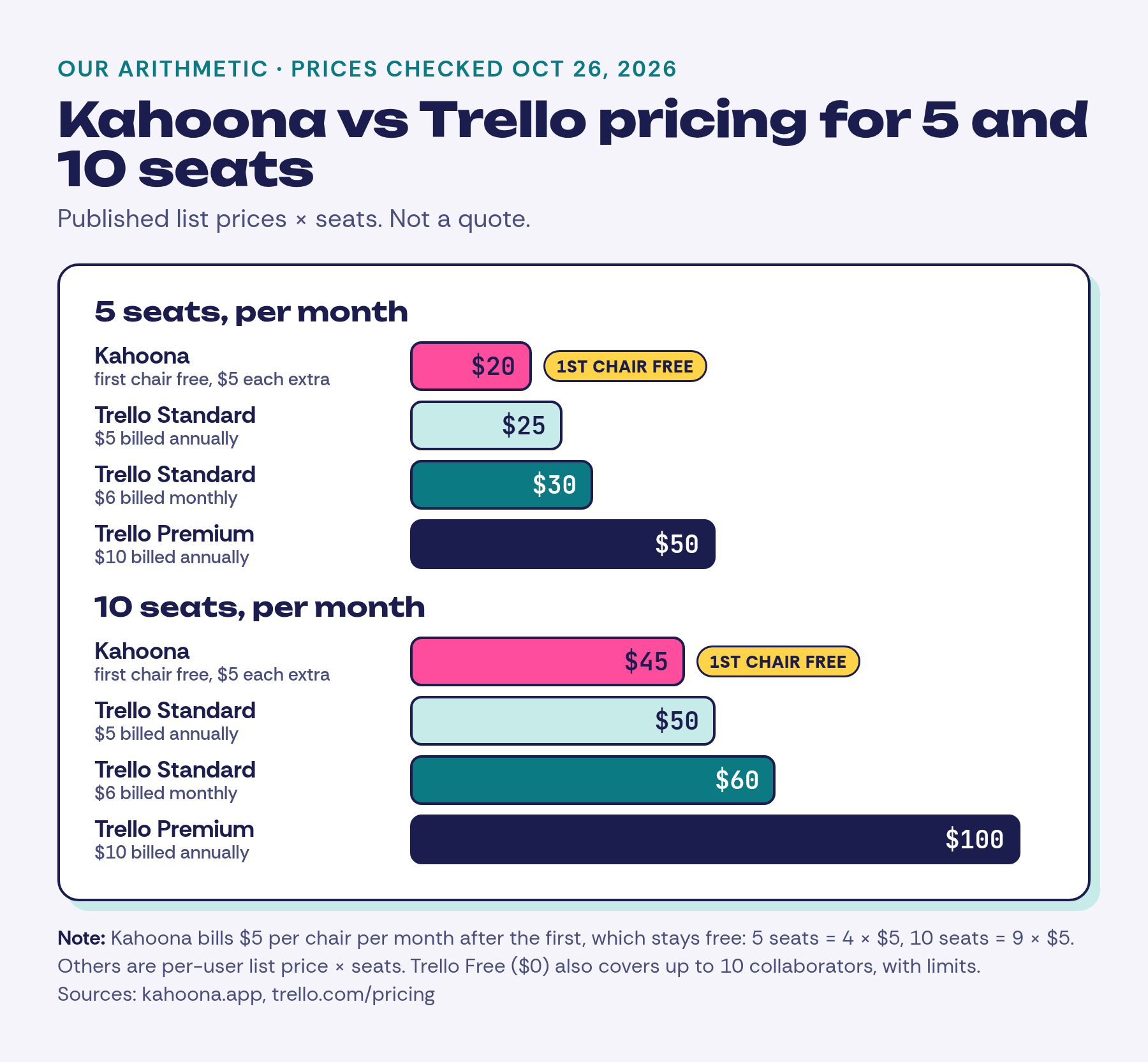
The free chair doesn't go away when the team starts paying. Trello Free is still the cheaper option if up to 10 collaborators fit inside its limits.
When to pick Trello instead
Choose Trello if:
- Your board isn't mainly about code. Content calendars, hiring pipelines, event planning and personal to-dos all fit Trello well. Kahoona is for dev work.
- You want a free plan for a small group. Trello Free allows up to 10 collaborators per Workspace. Kahoona's free plan is for one person.
- You want to customise heavily with Power-Ups. Trello allows unlimited Power-Ups per board, including on Free.
- You want calendar, timeline and map views. Trello Premium has them. Kahoona sticks to a board and a whiteboard.
- You already pair Trello with Copilot or another agent and it works. If the manual linking doesn't bother you, there's no real reason to switch.
How to try both fairly
Take one repo and one week. In Trello, set up a board, turn on the GitHub Power-Up and attach PRs as you go. In Kahoona, connect the same repo, add a CLAUDE.md and WORKFLOW.md, and hand a few small, well-scoped cards to an agent.
At the end of the week, look at how much time went into updating the board, how clean the agent PRs were to review, and what you were comfortable showing a client.
Also see: Kahoona vs GitHub Projects, Kahoona vs ClickUp, and ClickUp vs Trello vs Kahoona.