A Claude Code kanban board: who owns the next task?
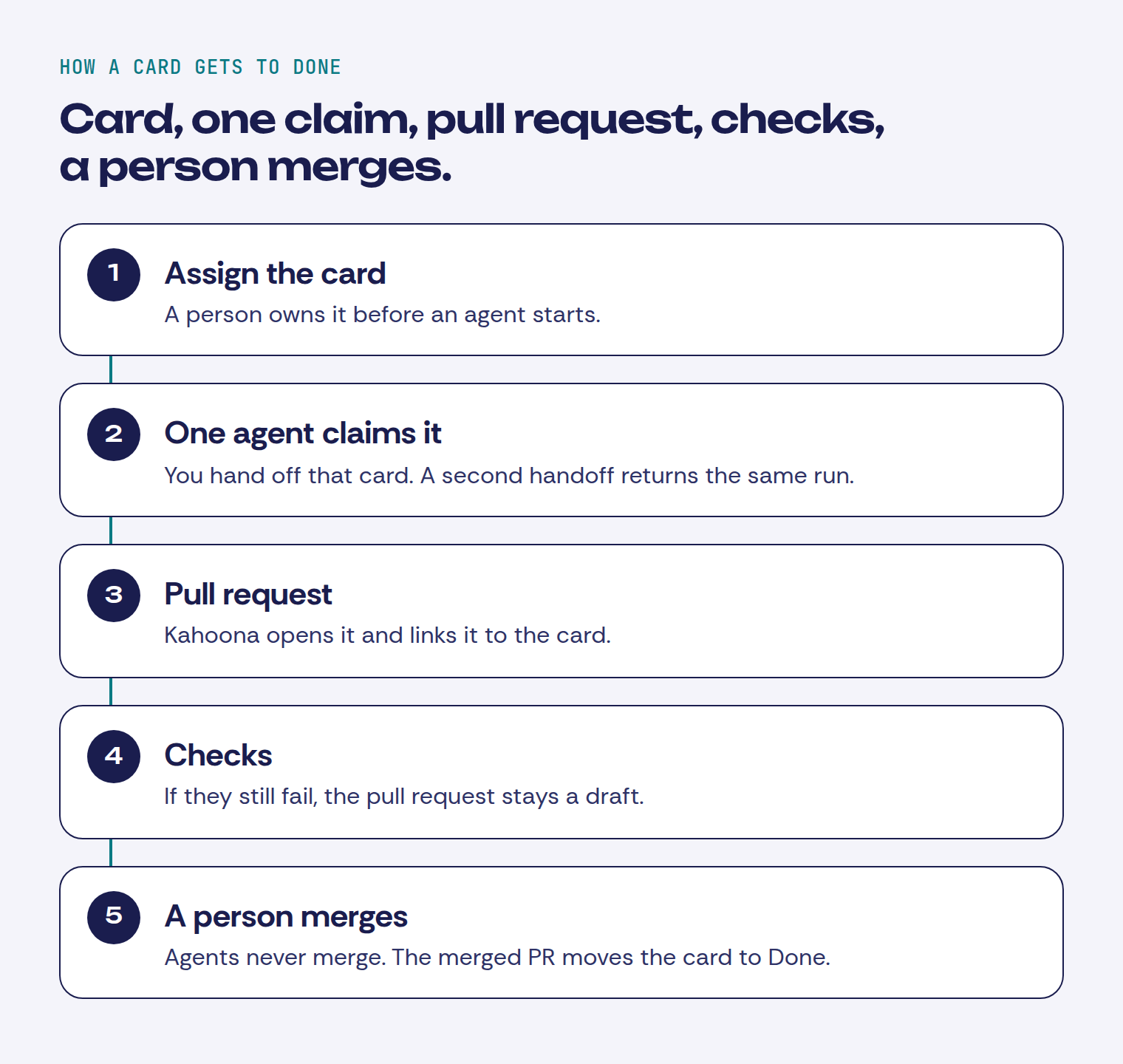
A Claude Code kanban board only helps if you can see who owns the next task. Assign the card, let one agent claim it, and don't call it done without a pull request and green checks.
If two coding agents can both take the next card, you don't have a board. You have a race. I want one owner on the card, and I don't call it done until there's a pull request and the checks passed. That's the whole Claude Code kanban board problem.
Two agents, one next task
Apparently in 2026 everyone has to build their own task board, usually with Docker, three services and half a GB of RAM to show a todo list. I built the opposite: a kanban board in your browser plus an MCP server, in one small Rust binary. Tell Claude Code or Codex "take the next task from kanzo" and it moves the card and comments as it works, which is more than I do.
Kanzo is someone's side project. A small self-hosted board, one binary, an MCP server, no account. The post is about keeping it tiny. Fair thing to build. The comment I care about is not about the megabytes.
u/oky_sabeni:
"If two agents on different machines take the 'next task,' how does the user see who owns it? Avoiding duplicate work would matter more to me than shaving off a few more megabytes."
Yup. The author replied:
"If they take a task they move it in “doing”, every task access is transactional, even 1000 agents can work on the same board at the same time"
That answers the race. The card moves, so two agents aren't supposed to land on it. oky_sabeni also asked how you see who owns it. The reply doesn't say. A name on the card is a different thing from a lock.
If you want a board you run yourself, Kanzo is a reasonable thing to try. If the work already sits next to the pull requests and you don't want another product in the middle, use GitHub Projects. Both are a better fit than Kahoona when that's the whole job.
Assign the card, then hand that card to one agent
A kanban board for AI agents only works if the next card has one owner. On Kahoona that owner is a person. The card shows their avatar. The standup puts their name on a column. Assign the card before an agent starts.
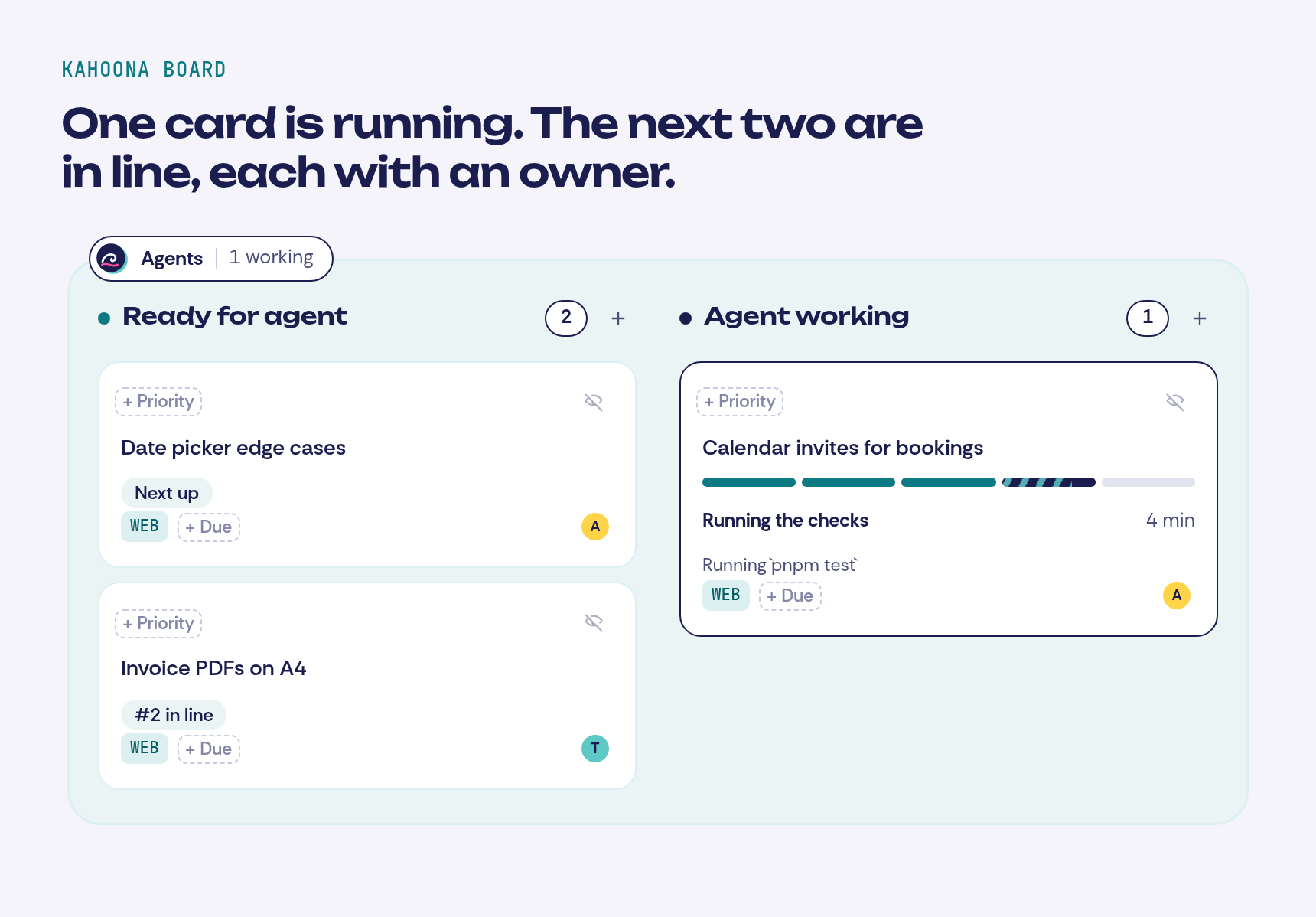
Kahoona's own agent does not race for "the next task". By default, dropping a card into Ready for agent starts it. You can switch that so only the Start agent button does. Hand the same card off again and you get the same run. A project runs one card at a time. The others sit on the board as Next up or #2 in line, and the assignee stays on them. While a run is going, the card shows the step, such as Running the checks, and the line it's on. Drag the card out of the agent lane and the run cancels.
Two Claude Code or Cursor sessions you point at the board yourself are outside that. They connect over MCP. list_tasks includes the assignee's user id, and update_task can set it. There is no claim that says this laptop's Claude owns WEB-14. Tell both sessions to grab whatever is free and they can both start. Assign the card, then give one agent that id. The commands for Claude Code, Codex, and Cursor, and the way a pull request that names the card moves it, are in Let Claude Code and Codex pick up tickets from your board with MCP.
An AI agent task board still needs a cap, or the queue turns into the same race with more cards. A free account can have two agent runs in progress and can start three a day. A free workspace shares six starts a day. That resets at midnight UTC. On a paid workspace a person can have four in progress and twelve starts a day, and the workspace can have six in progress and thirty starts. A project still runs one card at a time. Each run also stops at a spending limit. The default is $3 on that card.
A card is not done because the agent said so
This is the review process I established for Claude code.
Opinions are welcome.
u/Nice_Chef_6643:
"verification gate: it has to run the real commands and paste output before it's allowed to say "done". no evidence, no done."
Yup. And the follow-up is the one I actually use:
"for me ci is the real gate, the agent's paste is just a pre-check and nothing merges unless ci itself is green."
His process auto-merges when CI is green. On a team I don't. The agent opens the pull request. A person merges.
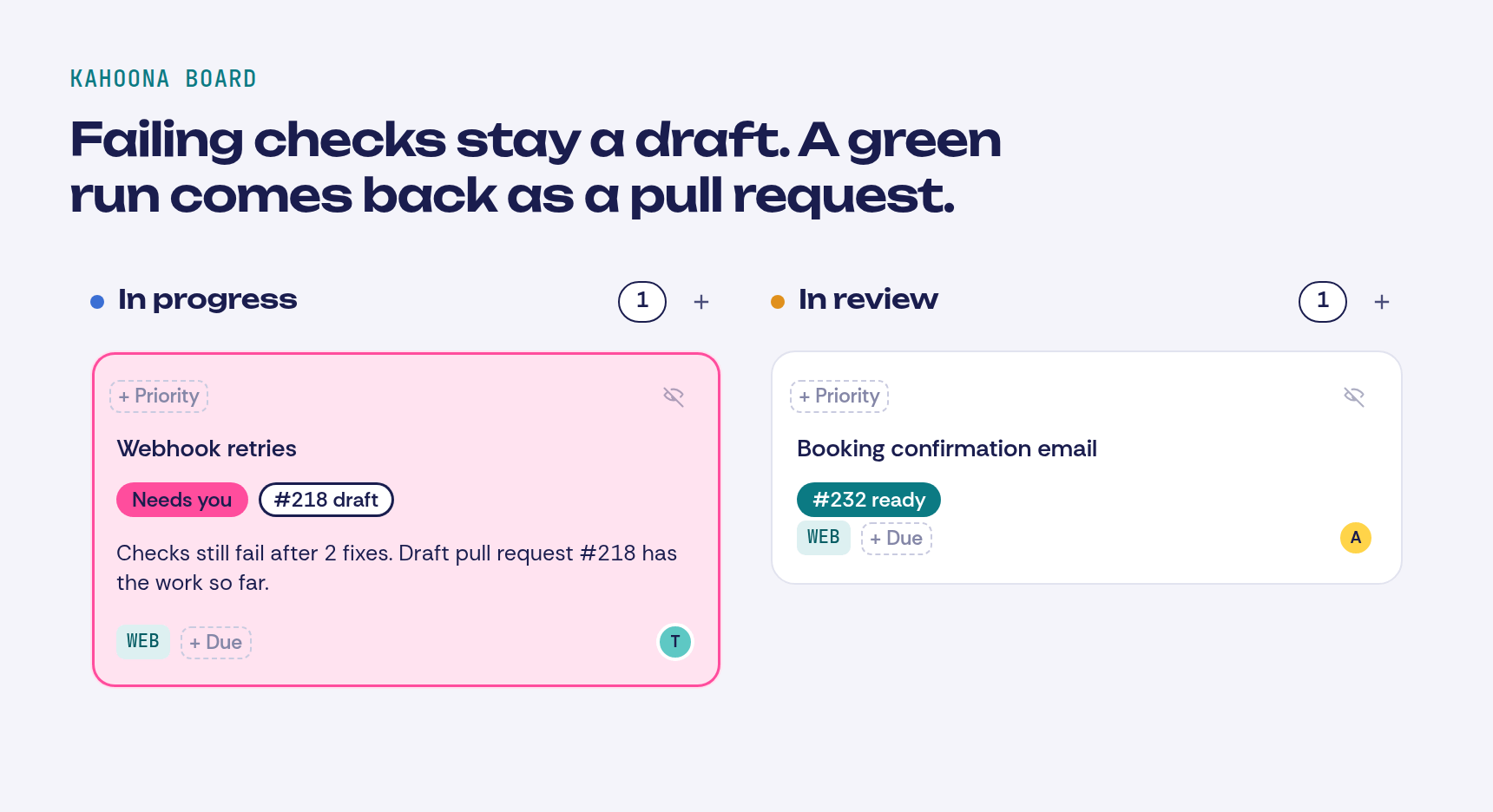
On Kahoona the agent runs the project's checks on its own computer and can fix failures twice. If they still fail, the pull request stays a draft and the card says it needs you, with the draft number. I don't treat those on-computer checks as the merge gate. They run the agent's own tree. GitHub's CI is the gate. Agents never merge, and they never deploy. Merging the pull request moves the card to Done. Until that happens it isn't done, even if the agent has stopped talking.
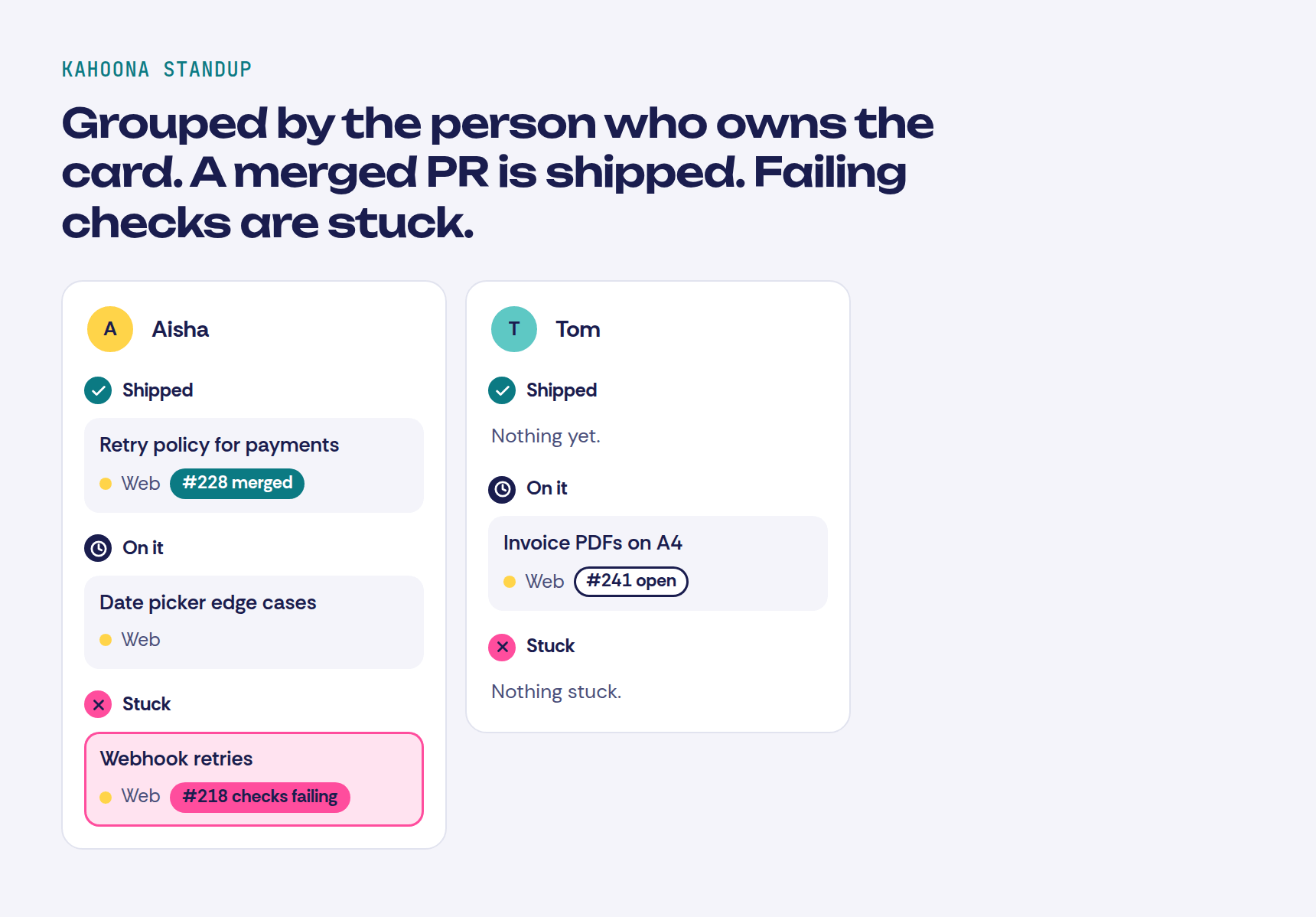
The standup is grouped by that same assignee. Shipped is what landed in the window, including a merged pull request. On it is the open work. Stuck includes a pull request whose checks are failing, so you can see it on the person who owns the card without asking them.
I don't want a standup meeting for the agents
I manage my AI agents like employees now.
Four times a day, my main assistant gives me a status update... 7:30 AM, 11 AM, 3:30 PM, and 9 PM.
Think of it like a standup meeting. Except nobody's late and nobody rambles about their weekend. 😂
Each update tells me three things:
-- What got done
-- What's stuck
-- What needs a decision from me
That's it. If nothing changed, I don't need to hear about it.
Before this, I was checking in on everything all day. Pinging agents. Wondering what was finished. Losing time to "where are we on this?"
Now the updates come to me at set times, and the rest of the day I can actually build.
If you're building an AI team, give them a reporting schedule early. It changes everything about how the day feels.
Builders running AI agents... how do yours report back to you?
"I manage my AI agents like employees now."
"Think of it like a standup meeting. Except nobody's late and nobody rambles about their weekend."
The instinct is right. I don't want four check-ins a day. I want the board to already have it. Kahoona's standup is that view, from the cards and from GitHub. The weekly digest on the GitHub tab groups the same repo activity by week. That's the Friday update. The counts are already there. The plain-English paragraph is written when you open the week, from the GitHub activity already on the page.
One of the most important bottlenecks that I’ve noticed when using coding agents to write all of my code is how I can verify the output of my coding agents, such as Claude Code or Codex.
u/shimoheihei2:
"Each PR should be prioritised by risk and then that should inform how much verification it needs. And human verification should only occur at the highest, most crucial level. Otherwise, if you need to review every kind of code, you just move the bottleneck from writing to reading."
I wrote up how I sort that in How to review AI agent pull requests without drowning. Boring changes get a quick look. Billing, auth, migrations and CI get a named person. And you don't hand agents more cards than the team actually reviews in a day.
Clients are a separate step. A client page is a snapshot of what you chose to share. Draft pull requests and the live board stay with the team. A reply comes into the Client Inbox, and nothing on the card changes until someone on the team accepts it.
If your board already works, keep it
You don't need Kahoona to do the rule. Assign the card. One agent on that card. No done without a pull request and green checks. A person merges.
I compared the board with the other tools here:
- Kahoona vs ClickUp
- Kahoona vs Trello
- Kahoona vs GitHub Projects
- ClickUp vs Trello vs Kahoona for small dev teams
Trello and ClickUp both link pull requests to cards. Use them if the rest of the company already lives there. Use GitHub Projects if you want the board in GitHub. Use something you host yourself, like Kanzo, if you don't want an account at all.
Where I use Kahoona is the loop. The card, the agent run, the pull request and the standup are the same thing, and the status comes from GitHub. I build it, so weigh that.
Kahoona is free for one person. On a team the first chair stays free and each extra chair is $5 a month, so five people pay $20 and ten pay $45. No card to start.
One owner, one agent on that card, a person merges. That's the whole thing tbh.