Kahoona vs Linear: a Linear alternative for AI agents
A Linear alternative for AI agents. Kahoona vs Linear on a waiting-on-you state, pull requests, small-team price and what clients see, checked 2 Nov 2026.
If you want a Linear alternative for AI agents, start with the moment the agent is waiting on a person. That is the bottleneck. Linear already has agents.
Agree. And a Linear for agents needs 4 things Linear for humans never needed:
1. "Waiting on you" as a first-class status. The bottleneck will be the human.
2. A receipt on every ticket: what changed, what it cost, how sure it is.
3. Approve, redo or take over inline, without switching context.
4. A budget per issue, in time and tokens, with a hard stop.
Theo Tabah, on what a Linear for agents needs:
1. "Waiting on you" as a first-class status. The bottleneck will be the human.
The same post also asks for a receipt on every ticket (what changed, what it cost, how sure it is), approve or redo or take over inline, and a budget per issue with a hard stop. I make Kahoona. Here is the part the board actually does.
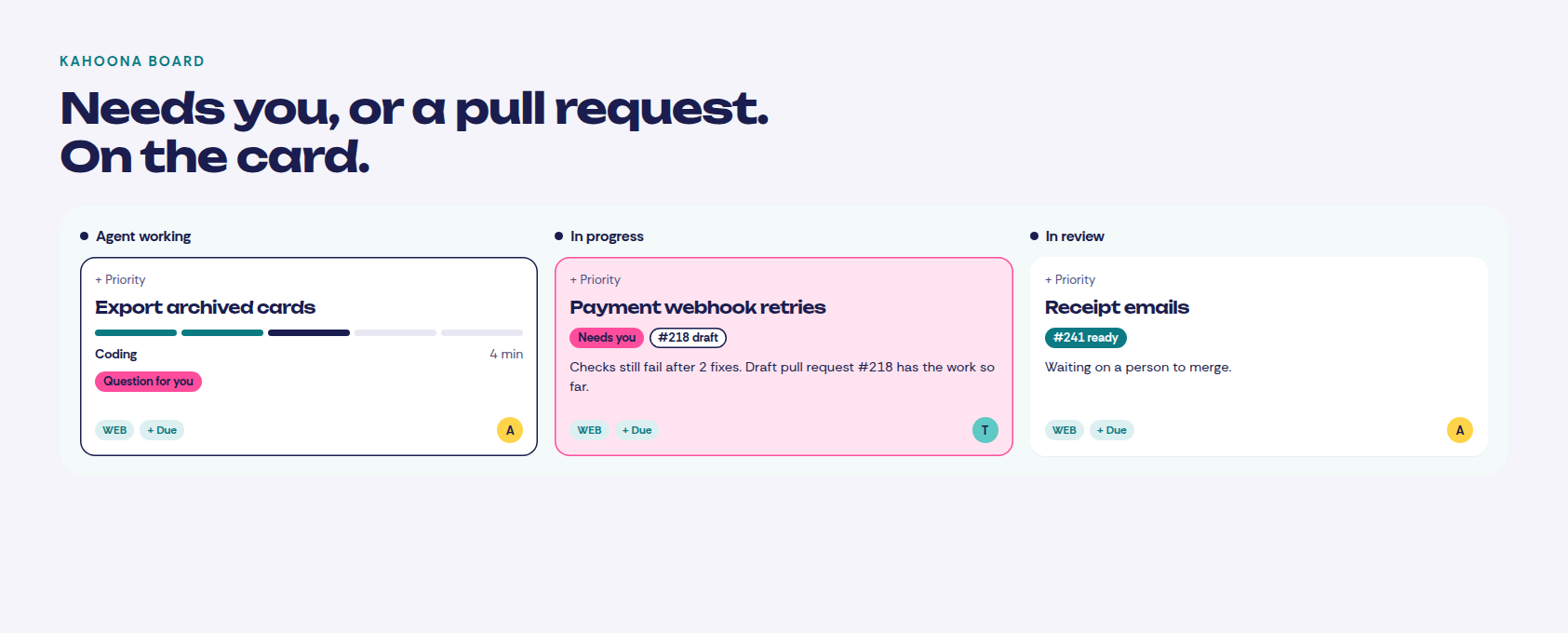
Needs you is the chip when a run stops and a person has to take it. Question for you is the chip when the agent asks something while it is still running. The reason is on the card. The card comes back to the person who asked. That is the waiting state. It is not a score for how sure the change is, and it is not an approve button sitting on the diff.
There is a spending limit per card. When the model's spend on that card hits the limit, the agent stops and hands the card back. That is a hard stop on spend. It is not a receipt of what changed.
The review is the pull request. You reply on the card, you can cancel the run, and a person on the team merges. Agents never merge or deploy. Linear's coding sessions let a teammate steer the session and review the diff inside Linear. That review is a place Linear is ahead. A GitHub pull request is not the same thing as approve, redo and take over on the issue.
The future of open source is rejecting outside code contributions entirely. Instead, contributors open issues, and maintainers use their own AI software factories to implement fixes to the project’s standards. No more AI slop PRs, just issues that turn into code.
"No more AI slop PRs, just issues that turn into code."
The issue, or the card, is the unit of work. Linear already does this. You delegate an issue and a coding session comes back as a draft pull request. Kahoona is the same shape. You hand an agent a card and it comes back as a GitHub pull request your team reviews. The difference is the board around that loop. It is not a claim that Linear cannot write code.
I make Kahoona, so weigh this with that in mind. Every Linear number below is from Linear's pricing page, checked 2 Nov 2026, plus the AI credits and coding sessions docs from the same day. Kahoona's price is on kahoona.app.
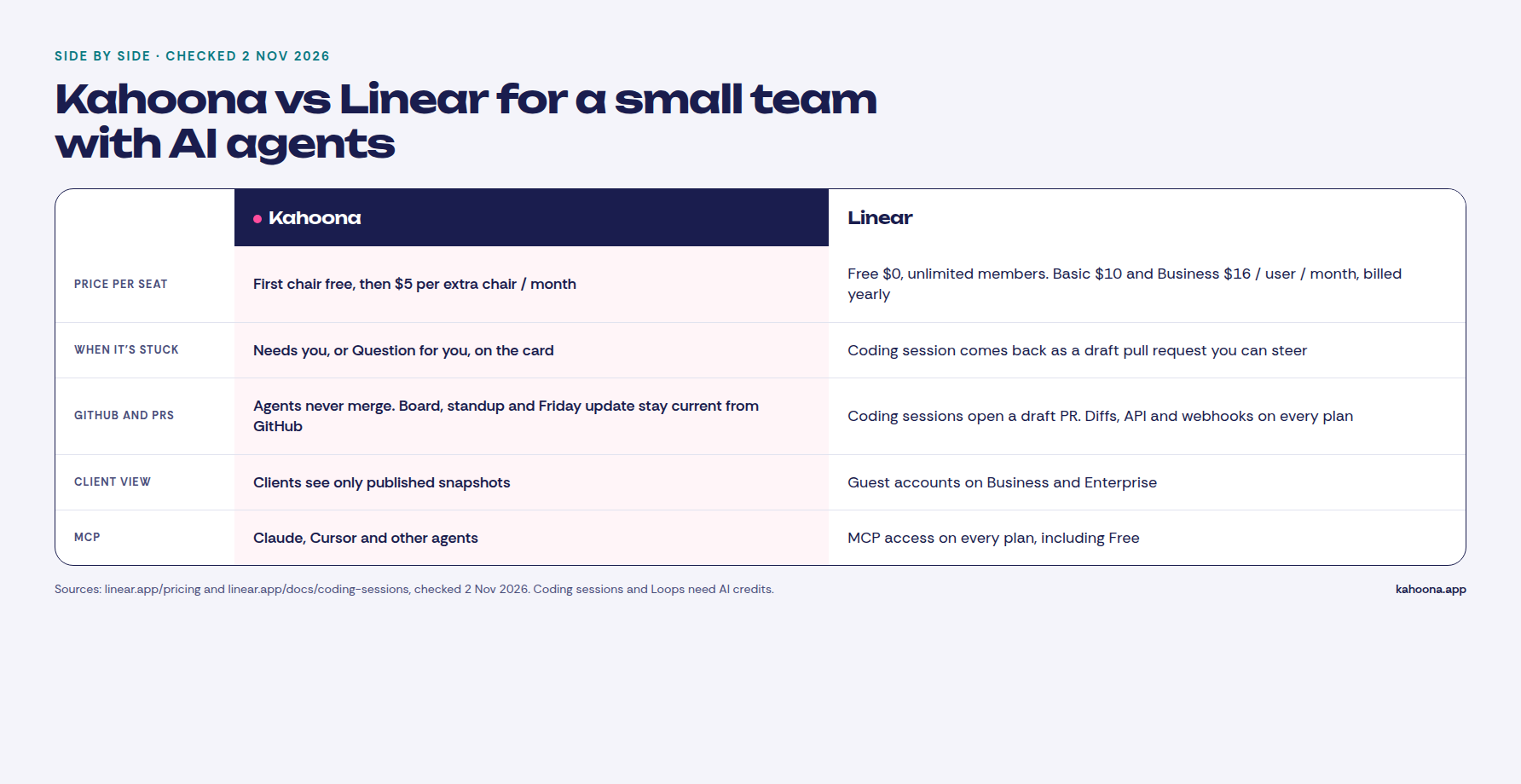
What you get if you want a Linear alternative for AI agents
Kahoona is narrow on purpose. It is one web board for a team and its AI agents.
- Needs you and Question for you are on the card. A run that stops says Needs you, with the reason, and moves back to the person who asked. A question while it is running says Question for you. You answer on the card.
- Agents work through pull requests and never merge. Hand an agent a card. It comes back as a GitHub pull request. If the checks still fail after two fixes, the pull request stays a draft and the card says Needs you. A run that gets through marks the pull request ready and moves the card to review. A person merges. A project runs one of those cards at a time.
- The standup and the Friday update stay current from GitHub. The standup groups the board by the person who owns the card. Shipped includes a merged pull request. Stuck is a blocker, failing checks, or a card waiting on the client. The Friday update is the weekly digest on the GitHub tab. The counts are the repo activity. The paragraph is written the first time you open that week, from the GitHub activity already on the page.
- Clients only see published snapshots. The Client Inbox and client pages get what you choose to publish. A client reply lands in the Client Inbox and does not change the card. Live edits do not change a snapshot that is already out.
- MCP access. Claude, Cursor and other agents connect to the board. The agent you assign a card to does not take a paid chair.
- $5 per extra chair, and free solo. The first chair stays free. No card to start. Web app only.
Who reviews those pull requests is the longer version in How to review AI agent pull requests without drowning. One owner on the card before an agent starts is in A Claude Code kanban board. Several sessions on one board is in How to manage multiple Claude Code sessions without watching them.
Linear already has agents
Linear does not lack agent support. The pricing page, checked 2 Nov 2026, lists these on Free, Basic, Business and Enterprise:
- Agent platform, Linear Agent, and MCP access.
- Coding sessions and Loops. Both are marked as needing AI credits.
- API and webhook access, issue sync, and diffs.
- Issues, projects, cycles and initiatives.
Guided reviews are listed from Basic up. Triage Intelligence, Code Intelligence and Linear Insights are on Business and Enterprise. Private teams and guest accounts are on Business and Enterprise.
A coding session takes a well-scoped issue, writes and tests the change, and returns a draft pull request. Teammates can follow it, add context, steer it, and review the diff in Linear. GitHub's own review rules still decide what ships. That is a real agent loop, on every plan, once the workspace has AI credits.
AI credits are a prepaid balance, not a per-seat fee. If you never add funds, coding sessions and Loops do not run, and Linear says you are not charged for them. Coding sessions bill model tokens at the provider's published rates, with no markup, plus sandbox time at $0.25 per 20-minute block. A Loop run that does not start a coding session is listed as typically $0.07 to $0.20. The minimum top-up is $10. I am not going to turn that into a monthly bill for a team. It depends on how much agent work you run.
So the honest split is not "Linear has no agents." Linear has the agent platform, the diff review, and the credits meter. Kahoona has the waiting state on the card, the pull request a person merges, the standup and Friday update from GitHub, and a client page that is a published snapshot.
Pricing
Checked 2 Nov 2026.
The seat prices are the yearly-billed prices on linear.app/pricing. The page shows a yearly billing toggle and no separate monthly price, so I am not inventing one. Kahoona's price is from kahoona.app.
Free is $0, with unlimited members, 2 teams and 250 issues. It includes the agent platform, Linear Agent and Loops. Basic is $10 per user per month billed yearly, with 5 teams and unlimited issues. Business is $16 per user per month billed yearly, with unlimited teams, private teams and guests, Triage Intelligence, Code Intelligence and Linear Insights. Enterprise is custom, annual billing only. I am not going to invent a number for it.
| Kahoona | Linear | |
|---|---|---|
| AI agents | Hand an agent a card, get a GitHub pull request back. One of those runs at a time per project | Agent platform, Linear Agent, coding sessions and Loops on every plan. Coding sessions and Loops need AI credits |
| Waiting on a person | Needs you when the run stops. Question for you when the agent asks. The card names the reason | A coding session can be steered, and it returns a draft pull request. Guided reviews from Basic up |
| Who merges | Your team. Agents never merge | Coding session opens a draft pull request. GitHub review rules still decide what ships |
| GitHub | Board, standup and Friday update stay current from GitHub | Issue sync, diffs, API and webhooks on every plan |
| MCP | Claude, Cursor and other agents | MCP access on every plan |
| Client view | Published snapshots only, via Client Inbox and client pages | Guest accounts on Business and Enterprise |
| Free plan | Free for one person | Free, $0, unlimited members, 2 teams, 250 issues |
| Paid plans | First chair free, then $5 per extra chair per month, no card to start | Basic $10 per user per month billed yearly. Business $16. Enterprise is custom. AI credits are extra |
What five people would pay. This is our arithmetic from the published prices, not a quote, and it leaves AI credits out. Linear Free for five people is $0, if you stay inside 2 teams and 250 issues. Linear Basic billed yearly is 5 × $10 = $50 a month. Linear Business billed yearly is 5 × $16 = $80 a month. Kahoona keeps the first chair free and charges $5 for each extra chair, so five people is 4 × $5 = $20 a month.
At ten people, Linear Free is still $0 inside those same caps. Basic billed yearly is 10 × $10 = $100 a month. Business billed yearly is 10 × $16 = $160 a month. Kahoona is 9 × $5 = $45 a month.
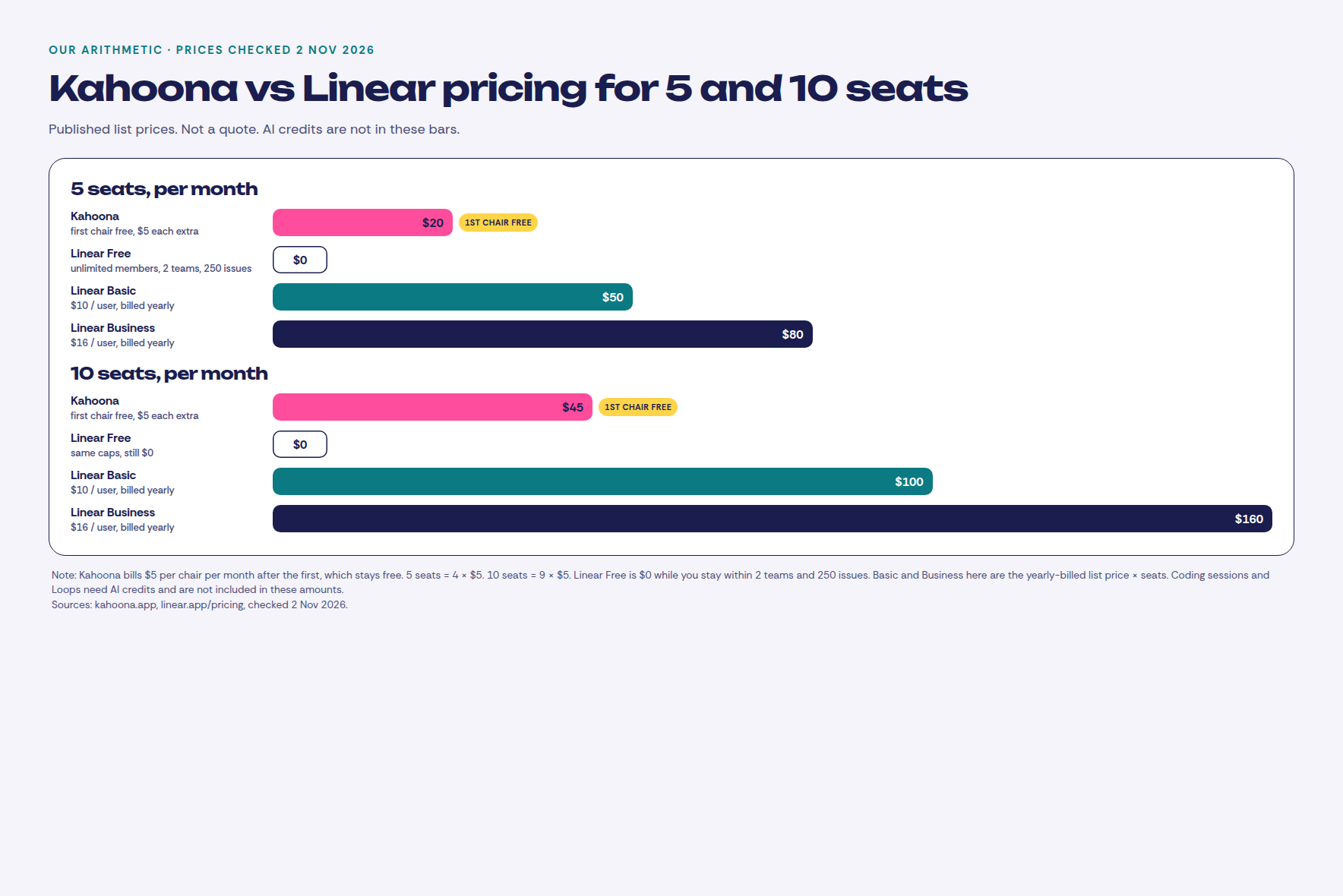
The free chair does not go away when the team starts paying. Linear Free is still the cheaper board if the team fits in 2 teams and 250 issues and you do not need this waiting-state loop. A $20 versus $0 gap is not why I would move a team that already fits.
When to pick Linear instead
Pick Linear if any of these are you:
- You want speed, polish, and a tracker people already know. Linear is the better issue tracker. Cycles, initiatives and triage are on every plan. I am not going to argue a new board beats that on feel.
- You want Linear's own agent platform. MCP, Linear Agent, coding sessions, Loops, diffs in the product, and guided reviews from Basic up. If steering the session and reading the diff inside Linear is the job, stay.
- The company is large. Unlimited members even on Free. Business adds private teams, guests, Insights, and Triage and Code Intelligence. Enterprise is the security and support tier. Kahoona is a web app for a small team and its agents.
- You want $0 for a small group and the waiting state is not the point. Linear Free covers unlimited members inside 2 teams and 250 issues, and the agent platform is on that plan. Kahoona's free plan is one person. Five people here is $20 a month, and that is the wrong buy if nobody is handing cards to an agent.
- You already live in Linear. If the issues, the cycles and the reviews are there, and you can see what the agent is waiting on, keep it.
How to try both fairly
One repo, one week. In Linear, use Free if you fit in 2 teams and 250 issues, and turn on a coding session only if you are willing to add AI credits. Notice where a stuck agent shows up, and whether you can see that without opening another tool. In Kahoona, connect the same repo and hand a few small cards to an agent.
At the end of the week, look at which cards were waiting on a person, who merged the pull request, and what a client was allowed to see.
Also see: Kahoona vs GitHub Projects, Kahoona vs Jira, Kahoona vs ClickUp, and Kahoona vs Trello.