A status update template for agents: BLUF, then SBAR
An AI agent status update should be skimmable. This status update template puts the bottom line first, then an SBAR handover, and names the next decision.
A status update is a waste of time if you have to read the whole thing to learn that you are the blocker. I want the bottom line first, then a short handover, and the next decision named. That is the status update template I use for people and for an AI agent status update.
tbh I don't want a paragraph. I want one line I can act on, and the rest only if I need it.
BLUF, then the handover
There has been a lot a lot of chatter here about getting agents to speak ASD-STE100 being nice but for observability agents BLUF and SBAR for handovers/status updates are very powerful
https://en.wikipedia.org/wiki/BLUF_(communication)
https://en.wikipedia.org/wiki/SBAR
Thomas Ankcorn posted that on November 9. He is talking about observability agents. The same failure shows up with coding agents. Claude Code, Cursor, and Codex will write you a diary. The diary is not a handover.
He linked the Wikipedia pages for the two names. I checked the sources those pages point at.
BLUF means bottom line up front. Army Regulation 25-50, paragraph 1-38, says effective Army writing is understood in a single rapid reading, and that two requirements are putting the main point at the beginning of the correspondence (bottom line up front) and using the active voice. That text is the 10 October 2020 edition. The Army Publishing Directorate still lists it as active, with an administrative revision dated 4 October 2024. The PDF is AR 25-50, and the record is on the Army Publishing Directorate.
SBAR is the handover under that first line. The Institute for Healthcare Improvement defines it as Situation, Background, Assessment, Recommendation. Situation is a concise statement of the problem. Background is the short related information. Assessment is what you found or think. Recommendation is the action you want. IHI credits Michael Leonard, Doug Bonacum, and Suzanne Graham at Kaiser Permanente of Colorado. AHRQ's TeamSTEPPS page uses the same four words, and it allows Recommendation or Request.
In an IHI Open School transcript, Bonacum says he labeled SBAR from how a submarine crew passed information up a chain: the situation, a little background, an assessment, and a recommendation the other person can turn down. He also says people use it on handoffs. I am not going to repeat hospital outcome numbers. I have not checked those studies.
For agents I keep AHRQ's Request reading of the R. The recommendation is the decision, and the last line names who it is waiting on. The SBAR template is the body. BLUF is line one, so a person skimming six cards never has to open the body to see the ask.
Which session is waiting on you
On r/ClaudeAI, I went through Claude's recent desktop updates. They all point to one change: you're managing a team of chats now, u/tahseenquraishi wrote:
"You have six sessions running. One has been stuck for 20 minutes waiting for your OK, and you have no idea which one."
That post is a feature roundup. I have not checked the desktop claims in it, so I am leaving them there. The sentence above is the problem.
u/elffg7878000 replied:
"I want each session to show 'working', 'waiting for me' or 'done', its last real action, and the next decision needed. A second session is only useful if I can tell whether it needs me without opening every conversation."
Yup. I don't have a useful session count either. I want the decision, and I don't want to open every Claude Code, Cursor, or Codex window to find it.
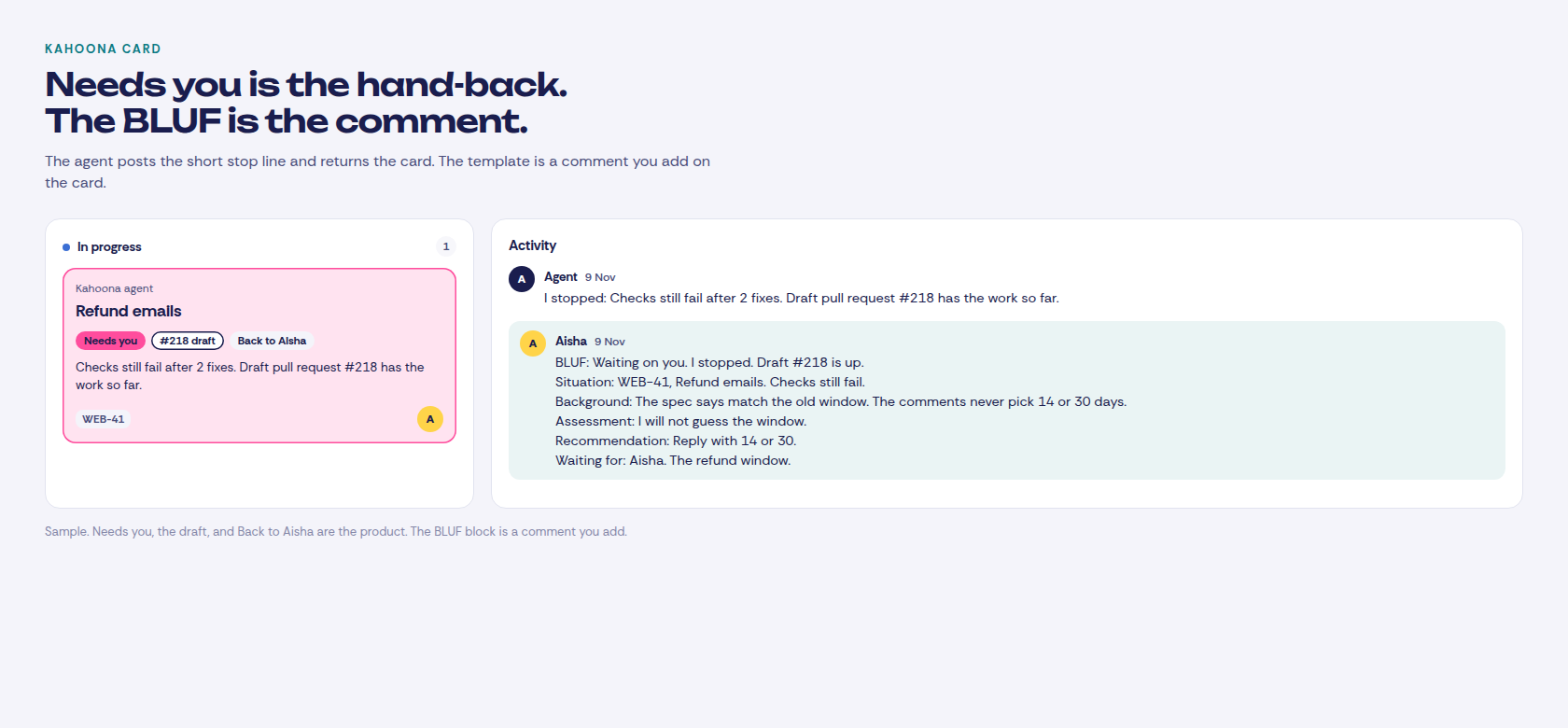
Kahoona does not have a status called working, waiting for me, or done. It also does not attach to those terminals. The MCP tools read and update the card. A running Kahoona agent shows the step on the card, such as Coding, and how long that step has been going. A question during the run says Question for you. When the run stops and a person has to take it, the card says Needs you, names the draft pull request if there is one, and says Back to the person who assigned it. That person is the assignee again. Done is the Done column. A merged pull request shows as Shipped on the standup.
The last action is that step line and the comment in Activity. The next decision is not a field. You write it. A Claude Code, Cursor, or Codex session you start yourself does not get a Needs you chip. That chip is Kahoona's own run. The session's status is the comment it leaves on the card.
How I keep several of those sessions on one board is in How to manage multiple Claude Code sessions without watching them.
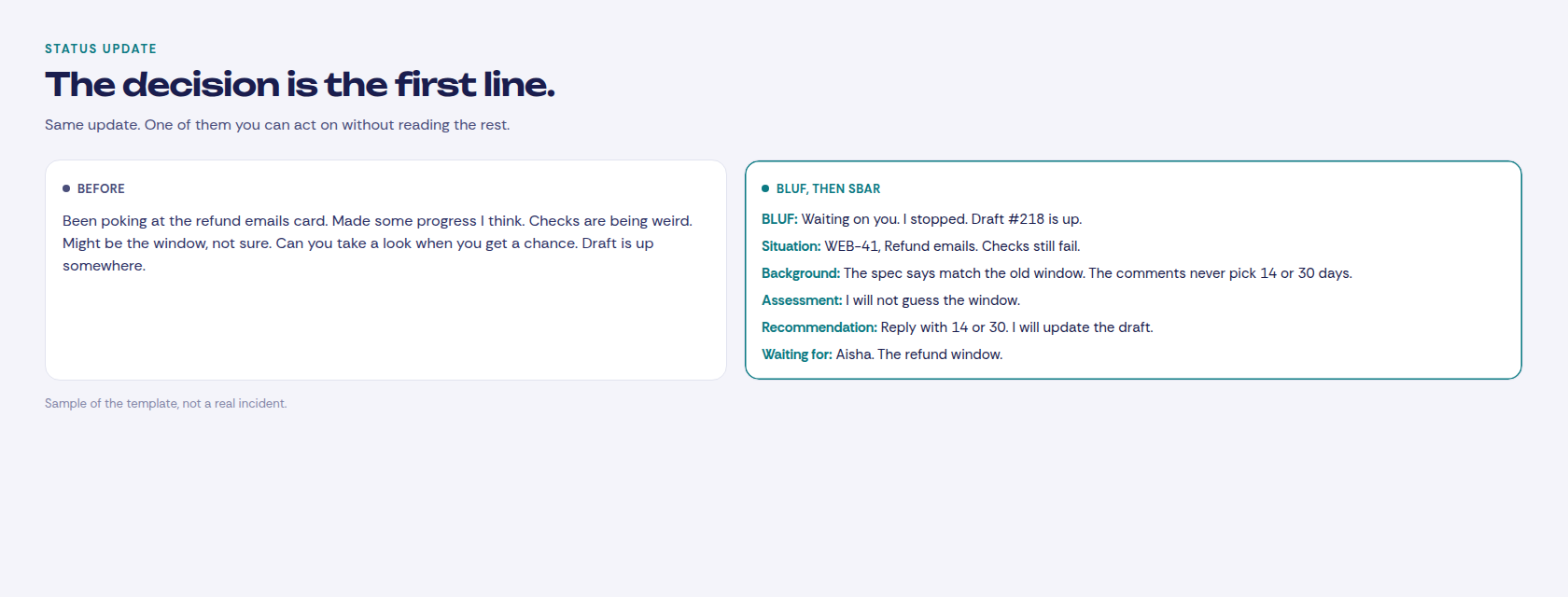
Paste this
The hand-back, for the agent giving the card back. Tell Claude Code, Cursor, or Codex to post it with comment_on_task and then stop. Or paste it yourself.
BLUF: {waiting on you, or not}. {one sentence of what happened}. {draft or pull request, if there is one}.

Situation: {card ref and title}. {the last real action}.
Background: {the spec line or comment that matters}.
Assessment: {what you think is blocking it}. {what you will not guess}.
Recommendation: {the decision, and who makes it}.
Waiting for: {name}. {the decision}.
The standup line. This is the async standup template. One BLUF line is enough for Slack. The four labels are there when the line is not.
BLUF: {on it, or waiting}. {the next decision}.

S: {card}. {column, or pull request state}.
B: {one fact a teammate needs}.
A: {blocked on a decision, or moving}.
R: {what unblocks it}.
The weekly note for someone who is not in the repo. A page, not the thread.
BLUF: {what changed, or what is waiting}. {whether you need them this week}.

Situation: {the week, in one line}.
Background: {what they already know}.
Assessment: {the wait is a review queue, a decision, or the work}.
Recommendation: {the ask, or nothing}.
I'm writing the post mortem tonight. Owner asked for "a page, not a novel" on why the client portal's social part took five months when I said six weeks in April. Here's the novel.
Meta app review, twice, the second time because the screencast showed a button that had since moved. YouTube uploads coming out private because our project was never audited. A LinkedIn form I still haven't sent. X doing whatever X does. None of that is code. I wrote maybe two weeks of code
In summer we gave up and moved publishing to Postproxy. The part of the page she'll read is that I stopped testing on a live gym's Instagram, there's a sandbox mode and I should have had one from day one anyway
The part she won't read is that the five months were me waiting for other people's review queues, and we now pay someone else to sit in them. That's the trade. I'm mostly fine with it
Six wks. I actually said that..
u/TheJbot is writing that page for a non-technical owner. The owner asked for "a page, not a novel". The sentence I keep is theirs: "the five months were me waiting for other people's review queues". The page the owner will read has to say the wait. The rest of that post is their incident, and I have not checked it.
What Kahoona already shows
I built Kahoona, so weigh this part.
The card holds the comment. When you assign a card to Kahoona's agent and a code run stops, the card goes back to the person who assigned it. A mention on a card someone already owns does not reassign it. The comment the agent posts is short. If the run gets through, it is "Pull request ready for review" and the pull request URL, the card moves to review, and the chip says the pull request is ready. If it stops for a person, the comment starts with "I stopped" and the reason. Checks that still fail after two fixes use the reason "Checks still fail after 2 fixes. Draft pull request #N has the work so far." The card says Needs you, names that draft, and says Back to that person. The agent does not write the template. You do, or the session does, in the same Activity thread. comment_on_task posts there as the person whose API key it is.
A person merges. Agents never merge, and they never deploy. Who that person is, before the run starts, is in Name a human owner before the agents open pull requests. Sorting the pull requests after they land is in How to review AI agent pull requests without drowning.
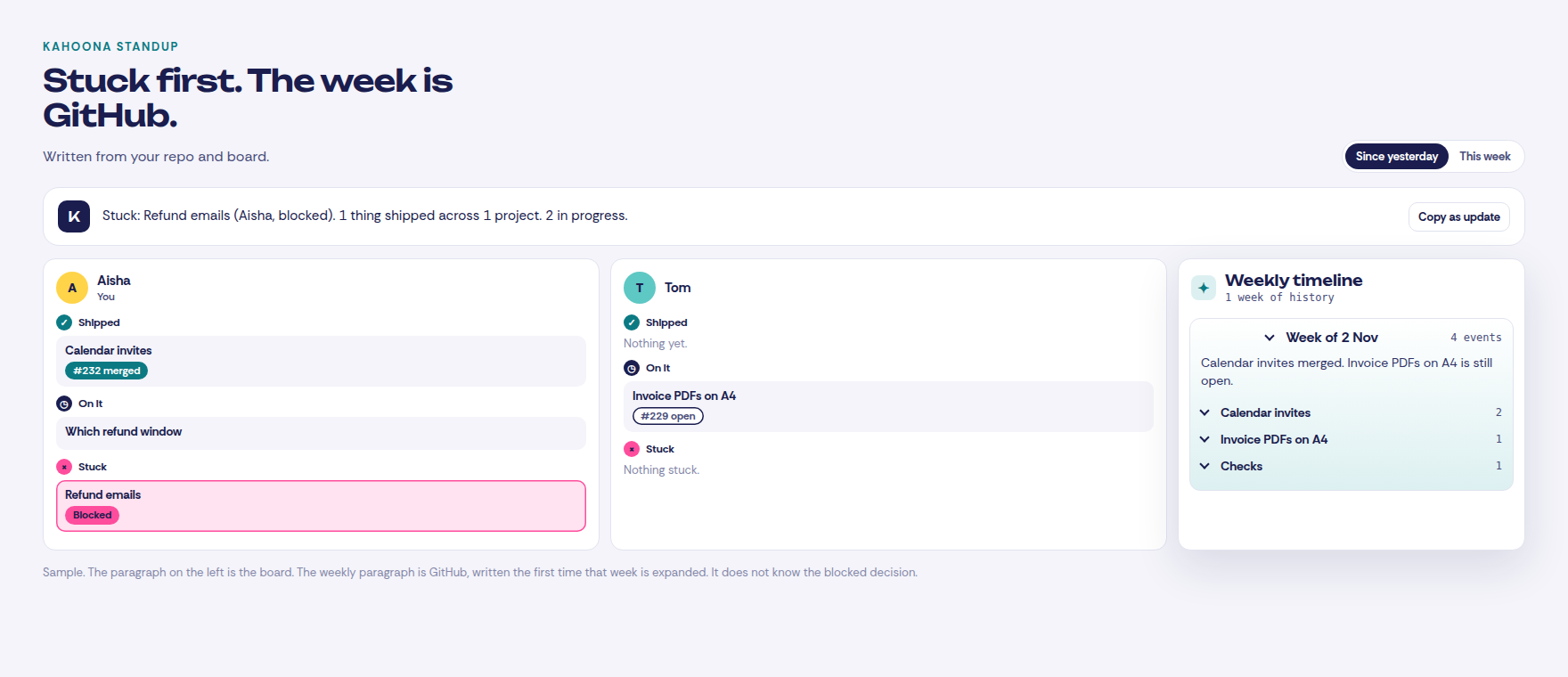
The standup groups the board by the person who owns the card. The ranges on the screen are Since yesterday and This week. The line under the switch says it is written from your repo and board. Shipped includes a merged pull request. On it is the open work. Stuck is an unfinished blocker, an open pull request whose checks are failing, or a card whose approval is pending or has changes requested. That last one is labeled Waiting on client. It is not a waiting-for-me flag. When you open the standup, if the paragraph is missing or older than an hour, Kahoona writes one. It names what is stuck first. If the model is not available, the paragraph is the plain counts from the same data, still stuck first. Copy as update copies that paragraph. It does not copy the BLUF you typed on the card. Read the comment for the decision, and the standup for whose name it is sitting on.
The Friday update is the weekly timeline on the GitHub tab. Weeks start on Monday, UTC. Each pull request and issue is its own theme, titled from that pull request or issue. Loose commits, checks, and notes fall into those three buckets. The counts are already there. The paragraph is written the first time you expand that week, from the GitHub activity in the week. It does not know a decision that exists only on the card. Over MCP, weekly_digest returns the counts, the themes, and a paragraph only if one was already written. That call does not write a new one.
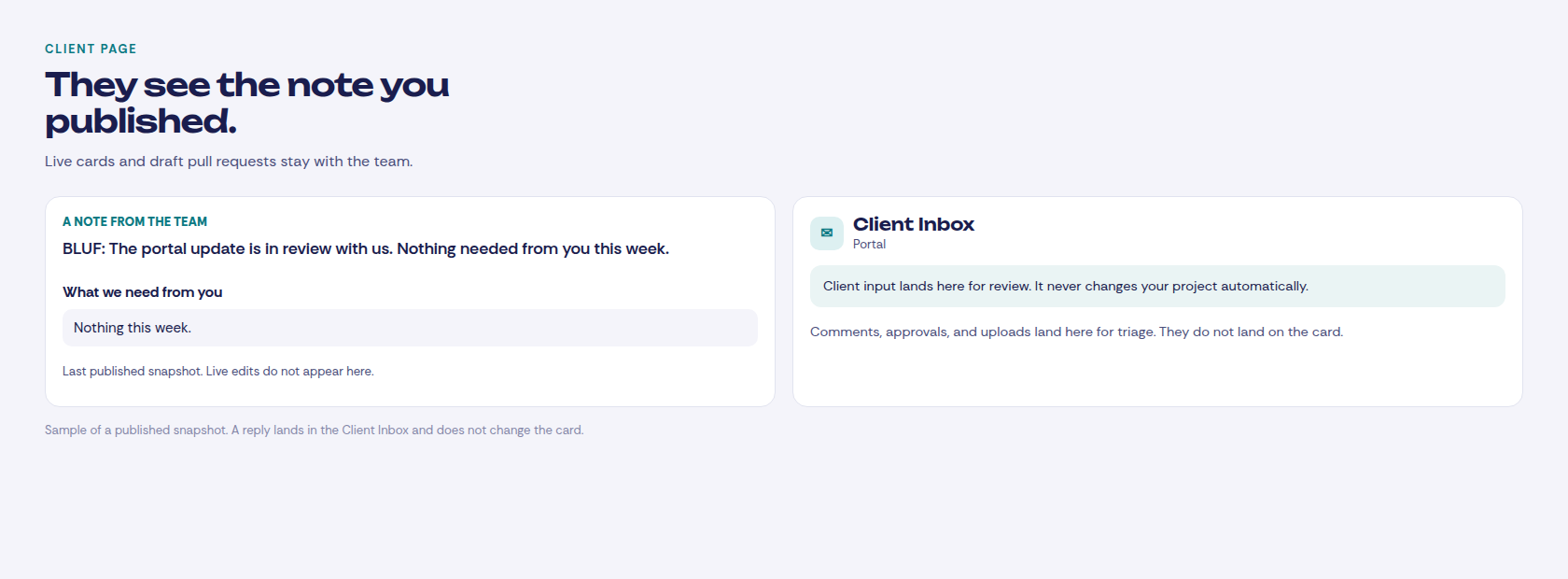
Clients stay off the live board. You publish a snapshot, and live edits do not change it. The message field is "Your message to this client". On the page they open, it shows as "A note from the team". Put the BLUF there. "What we need from you" is the checklist under it, one line each. Put the recommendation there, or leave it empty when you need nothing. Draft pull requests and the internal comments stay with the team. A client reply lands in the Client Inbox. It does not change the card.
If the questions are already visible in Linear, stay there. I compared the boards in Kahoona vs Linear. If the company already lives in Jira, same answer, in Kahoona vs Jira.
Kahoona is the wrong tool when you want the agent to merge, or when you want a working, waiting, and done lamp on every Claude Code terminal. I don't read those terminals. The card, the comment, and the standup are the status.
Kahoona is free for one person. On a team the first chair stays free and each extra chair is $5 a month, so five people pay $20 and ten pay $45. No card to start. It is a web app.