Name a human owner before the agents open pull requests
Agents write faster than teams review. Put a person on the card before the run starts, keep the merge with that person, and leave AI-on-AI review for comments, not the gate.
Five agents on one codebase is fine. Who owns AI agent pull requests is the person named on the card before any of them starts, and that person keeps the merge.
One developer.
Five AI agents.
One codebase.
Who takes responsibility when all five break production? 💀
Moniiii posted that on November 6. One developer. Five AI agents. One codebase. Then, in their words, "Who takes responsibility when all five break production?" I want that name on the card before the run.
The queue got bigger
AI can make developers 10x faster without making the team 10x faster.
Writing code is only one part of shipping software. Reviews, testing, coordination, debugging and deployment still take time.
And when code arrives faster than the team can review or test it, AI doesn't remove the bottleneck. It moves it downstream and makes the queue bigger.
The real productivity gain comes from speeding up the entire path from idea to production, not just code generation.
If you want AI to make your team ship faster, find where work gets stuck and fix that next.
Bobo Lin wrote, "AI can make developers 10x faster without making the team 10x faster." That 10x is their claim. I have not measured it, and I am not going to repeat it as a result. The next lines are the ones I use. Writing code is one part of shipping. Reviews, testing, coordination, debugging and deployment still take time. When code shows up faster than the team can review or test it, the bottleneck moves downstream and the queue gets bigger.
People are also asking how to keep the tasks outside the chat. Put the task on a card, with a name on it.
Name a human owner before the agents start
Assign the card to a person before you point Claude Code, Cursor, or Codex at it. That person is the human owner for those coding agents. The standup groups by whoever owns the card, so stuck work shows up under their name.
Kahoona's own agent runs one card on a project at a time. The cap is one run, maxConcurrentRuns set to 1. The others wait as Next up or #2 in line, on the team's own columns. There is no separate agent lane. While it runs, the card shows the step, such as Coding. A question during the run says Question for you. You answer on the card. If the run stops and a person has to take it, the card says Needs you and it goes back to the person who asked. Checks that still fail after two fixes leave a draft pull request, and the card names the draft. The run has a Stop button. Stopping cancels it.
Sessions you start yourself are separate. Kahoona does not read a Claude Code, Cursor, or Codex terminal, and it does not create their worktrees. Connect the session over MCP, give it the card id, and tell it to call get_task before it edits. If it needs a decision, comment_on_task and stop. attach_commit stores the SHA and leaves the column alone. MCP has no claim lock, so two sessions can both start an unassigned card. Assign it to one person, then point one session at that id.
Who owns the next card is in A Claude Code kanban board: who owns the next task?. Several sessions on one board, without watching the spinners, is in How to manage multiple Claude Code sessions without watching them. The setup for Claude Code, Cursor, and Codex is in Let Claude Code and Codex pick up tickets from your board with MCP. Which calls that person still makes, and which the agent makes alone, is in What coding agents should decide, and what they should ask you. The same name, when you answer for the date and someone else does the work, is in Project manager accountability when you don't do the work.
The merge gate stays with that person
Third or fourth time this has happened now.
Someone sends a fully AI generated PR (single Claude coauthor commit, walls of text in description).
I review it with AI first, give feedback about why it doesn't make sense to add it this time and close it.
They say my feedback was AI generated.
Buddy WTF.
pushpak has hit this a few times. Someone sends a fully AI generated pull request, a single Claude coauthor commit, walls of text in the description. pushpak reviews it with AI, says why it does not belong this time, and closes it. The author says the feedback was AI generated. Their closer was "Buddy WTF." Once both sides are a model, the comment is easy to throw out.
AI review of an AI pull request can live in the comments. The merge gate for those AI coding agents stays with the person named on the card. GitHub's CI is the check I trust. Kahoona's agent runs the project's checks on its own computer and can try to fix a failure twice. If they still fail, the pull request stays a draft and the card says Needs you. I don't treat those on-computer checks as the gate. They run on the agent's own tree. A run that gets through moves the card to review and marks the pull request ready. A person merges. Agents never merge, and they never deploy.
A merge moves the card to Done when the title or body uses a closing word, such as fixes WEB-14, and the merge lands on the branch the project watches. A mention with no closing word does not finish the card.
How I sort a pile of those pull requests is in How to review AI agent pull requests without drowning. Checking the card before the diff is in AI code review vs verification: check the card, then the diff.
Put the name where you can see it
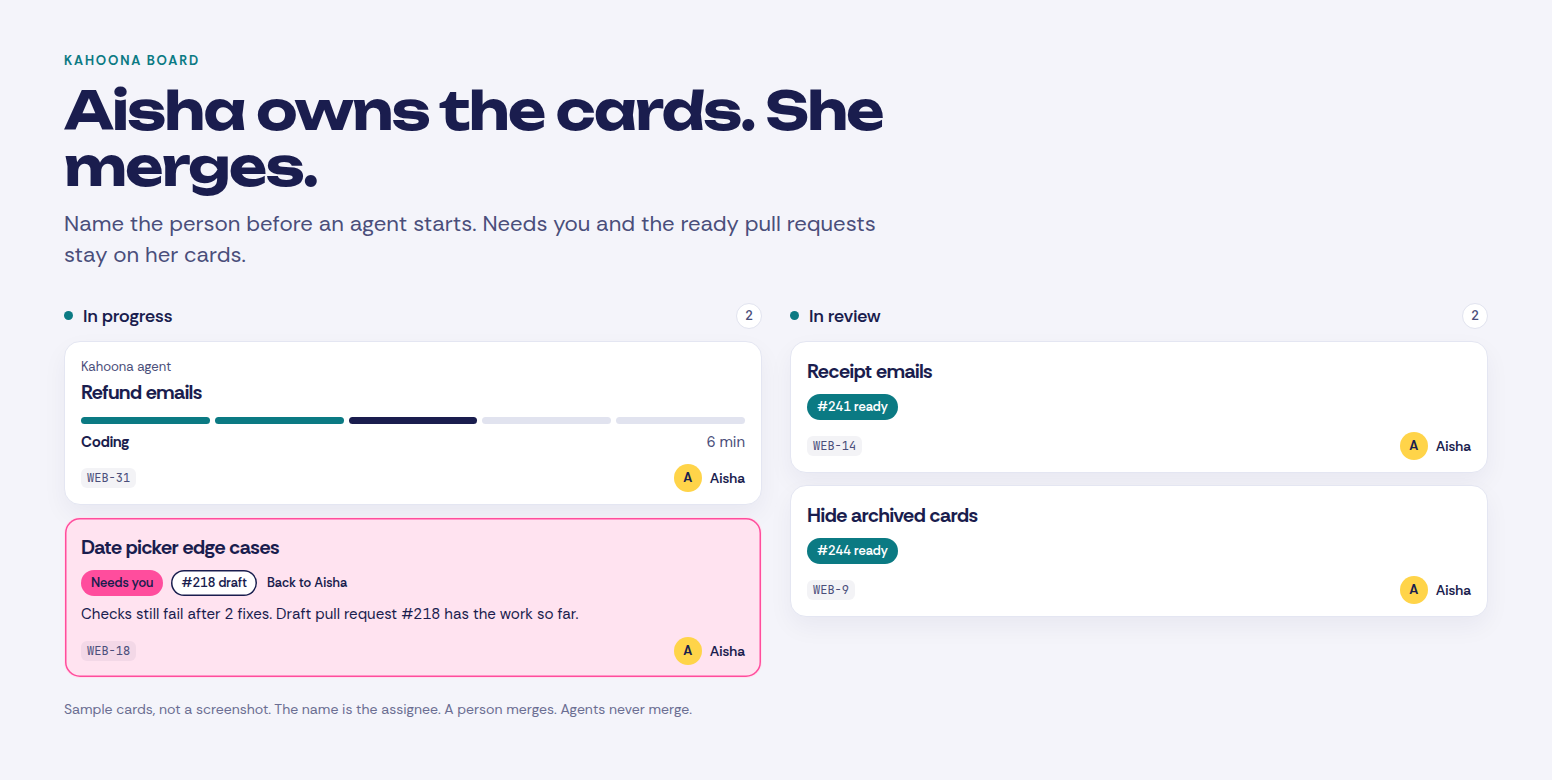
Each card has a person on it before an agent starts. The running card is the one Kahoona run on the project. Needs you is the one waiting on that person, with the draft pull request. A run that got through sits in review with the pull request marked ready. The standup uses the same name.
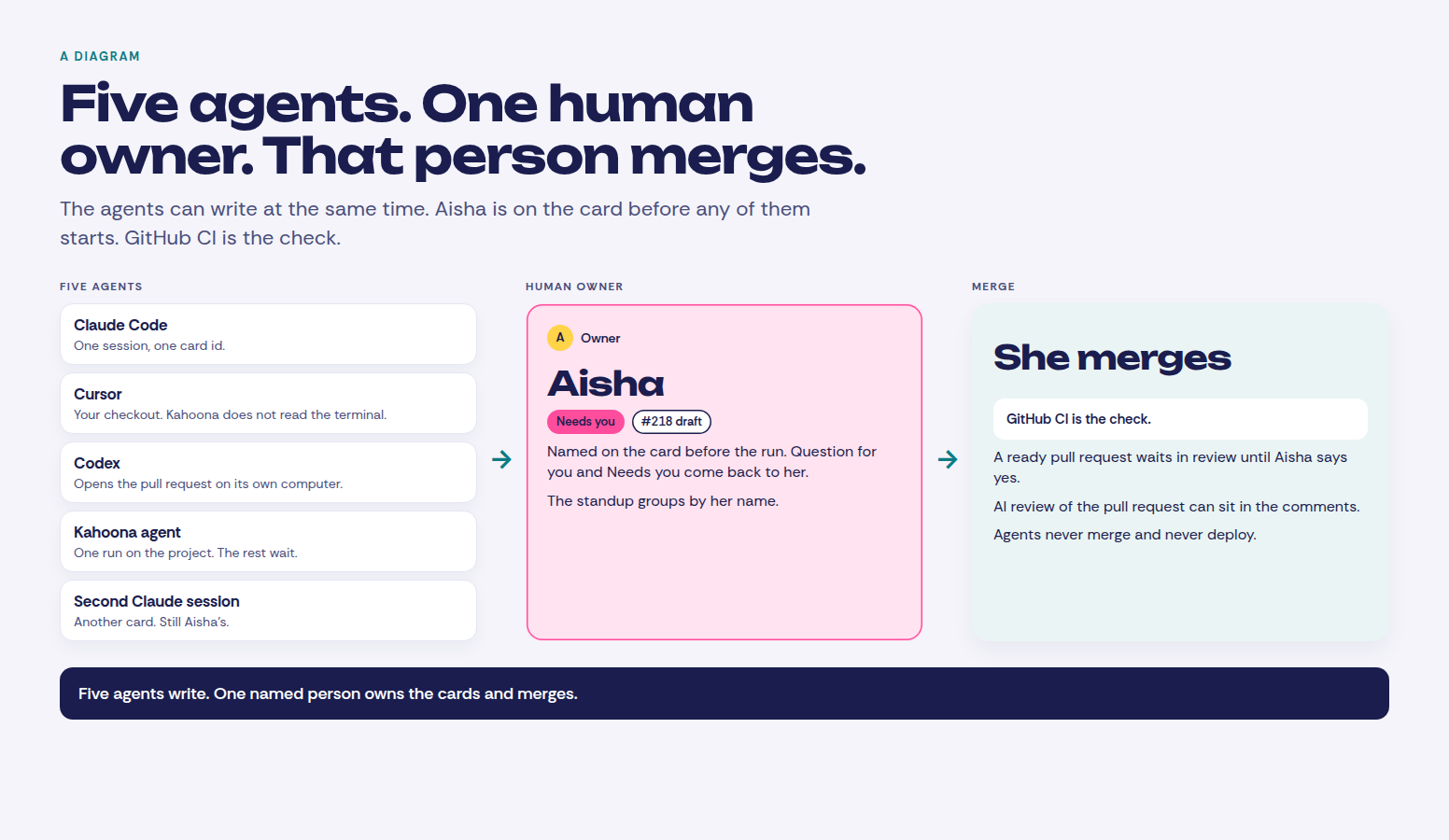
Five agents can write. One human owner. That person merges. An AI comment on the pull request does not replace them.
When Kahoona is the wrong board
If the questions are already visible in Linear, stay there. I compared the boards in Kahoona vs Linear. If the company already lives in Jira, same answer, in Kahoona vs Jira. ClickUp is the right tool when several departments need docs, chat, planning and tasks in one place. That comparison is Kahoona vs ClickUp. GitHub Projects is the right board when you want it inside GitHub and you do not want another product. That comparison is Kahoona vs GitHub Projects.
I use Kahoona when the team and the agents share one board, a person is named on the card before the run, and the work comes back as a pull request that person merges. I built it, so weigh that. It is the wrong tool when you want the agent to merge, or when you want the agents running and no name on the work.
Clients do not see this. A client page is a snapshot of what you published. Live edits do not change that snapshot. The questions and the draft pull requests stay with the team.
Kahoona is free for one person. On a team the first chair stays free and each extra chair is $5 a month, so five people pay $20 and ten pay $45. No card to start. It is a web app.
Name the person on the card. Then start the agents. That person merges.