Kahoona vs Jira: a Jira alternative for small teams
A Jira alternative for small teams that ship with AI agents. Jira vs Kahoona on price, pull requests, Rovo and what clients see, checked October 28, 2026.
Jira is a bad fit for a small team that wants something easy. The price is not the reason. Jira Free is $0 for up to 10 users.
A 3-person capstone asked r/agile for a board that is free and easy to navigate. The examples they were given were Jira, GitHub Projects and Trello.
hi everyone! i'm a senior cs major, and we've started planning our capstone project this semester, which will continue into the next semester for the actual building/coding phase. we are a 3-person group and are trying to figure out which project board to use as we are tasked by our professors to pick one and to justify why we picked this project board.
examples given to use were: jira, github projects, trello, etc
for a capstone project, what do you guys recommend to use (preferably free and easy to navigate)? and is scrum, kanban or mix of both a better fit for 3 people?
TIA guys :)
u/dhd_jpg:
"examples given to use were: jira, github projects, trello, etc"
"for a capstone project, what do you guys recommend to use (preferably free and easy to navigate)?"
u/Bernhard-Welzel:
"Stay away from Jira or anything with an "Enterprise" sticker ;-)"
Yup. Free covers three people. Easy does not. The UI is the problem, and people who use it still say so.
WHY IS JIRA SO BAD!
I create an epic and start to add work items. As I add work items, previous ones disappear or the whole list is gone and I have to refresh the page. Things don't assign to me or auto assign to me randomly. Its also slow af. How is this the industry standard??
"WHY IS JIRA SO BAD!"
"I create an epic and start to add work items. As I add work items, previous ones disappear or the whole list is gone and I have to refresh the page."
"Its also slow af. How is this the industry standard??"
The list vanishes while you fill it in, and you refresh to get it back. I would not put a capstone on that.
Then there is the agent problem. People are already building their own, because Rovo did not do the job.
Curious if anyone here is using Jira as a place to interact with AI agents, beyond Atlassian’s Rovo. I’m particularly interested in whether you’ve connected any external or custom-built agents to Jira, and what that interaction looks like in practice.
For example: ● Do you interact with agents through issue comments, mentions, or some other mechanism? ● Are agents actively participating in workflows, or mostly performing background automations? ● Do you actually find Jira a useful interface for working with agents, or do you prefer interacting with them elsewhere (Slack, IDEs, etc.)?
Would love to hear about any real-world setups, experiments, or experiences, even if you’ve tried something and it didn’t work out.
u/karlitooo:
"Rovo is awful, I tried to use it a few times but its beyond bad."
"Another one generates status reports, shows me the open items I give updates, it updates back to Jira and spits out a PPT for mgmt."
That second sentence is the complaint. The board does not tell you what shipped, so someone wires Claude to Jira, types the updates, and exports a slide. Connecting Claude Code to Jira so the agent only reads the ticket faster is in Claude Code to Jira won't fix your process. I want the standup and the Friday update to already match GitHub.
I built Kahoona for that loop. It is one board for a team and its AI agents. You hand an agent a card and it comes back as a GitHub pull request. Your team reviews it and merges it. Agents never merge. The board, the standup and the Friday update keep themselves current from GitHub. Clients only see what you publish, in the Client Inbox and on client pages. Claude, Cursor and other agents connect through MCP. It is a web app.
Free while it is just you. On a team the first chair stays free and each extra chair is $5 a month. No card. Those figures are on kahoona.app.
I make Kahoona, so weigh this with that in mind. Every Jira number below is from Atlassian, checked October 28, 2026.
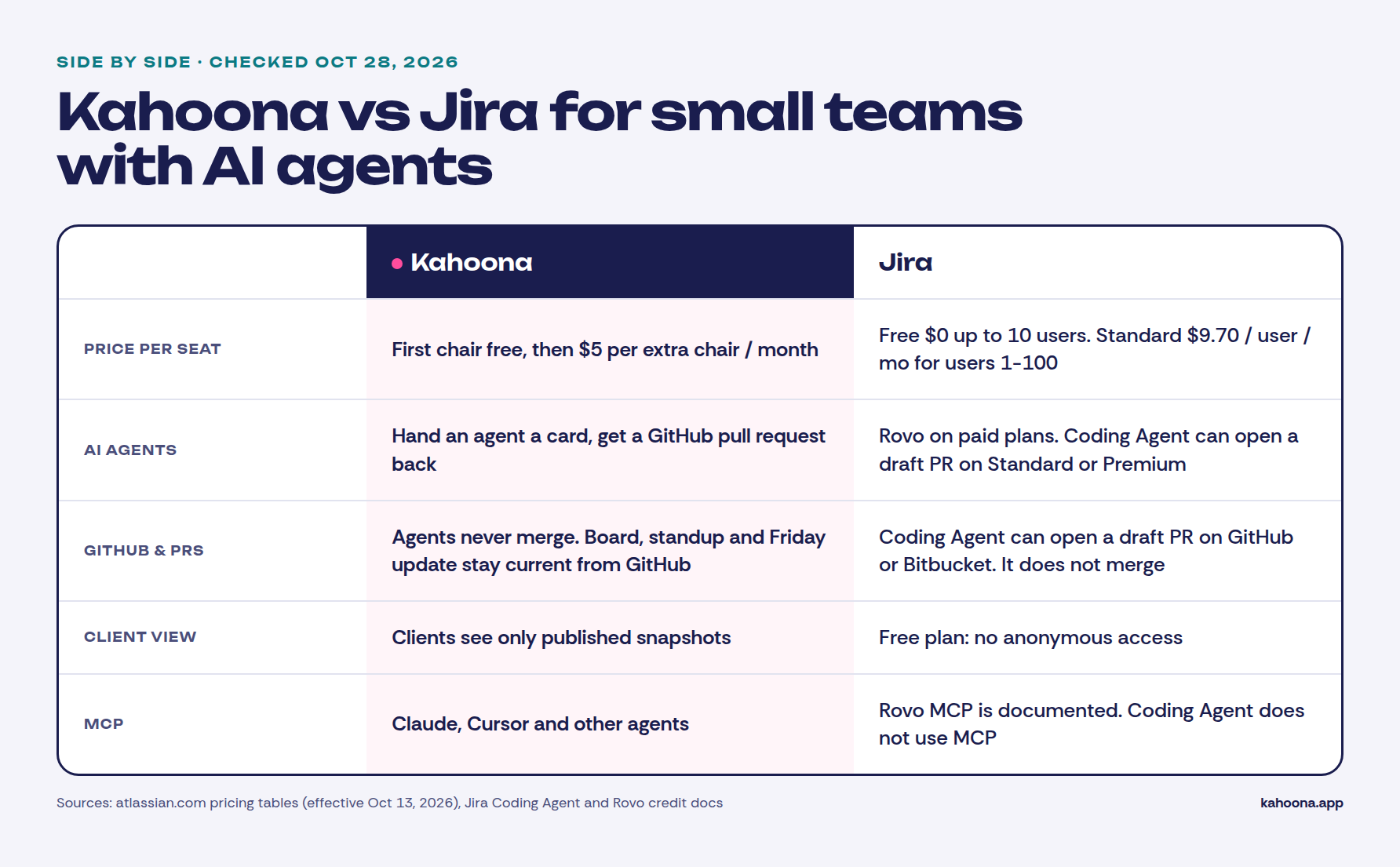
What you get if you want a Jira alternative for small teams
Kahoona is narrow on purpose:
- Agents work through pull requests and never merge. Hand an agent a card. It comes back as a GitHub pull request. A person on the team reviews it and merges it.
- The standup and the Friday update stay current from GitHub. Nobody writes the weekly status from memory, and nobody builds a slide deck to say what merged.
- Clients only see published snapshots. The Client Inbox and client pages get what you choose to publish. The live board stays with the team.
- MCP access. Claude, Cursor and other agents connect to the board.
- $5 per extra chair, and free solo. The first chair stays free. No card to start. Web app only.
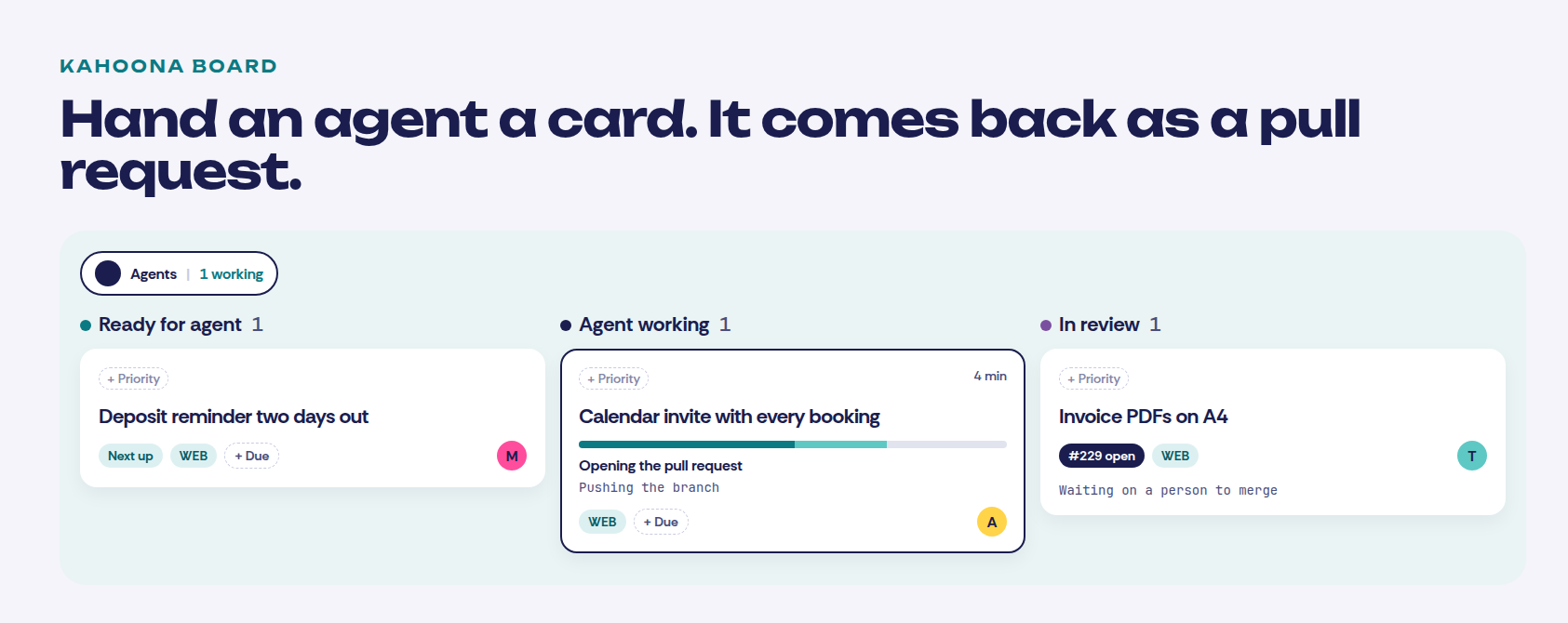
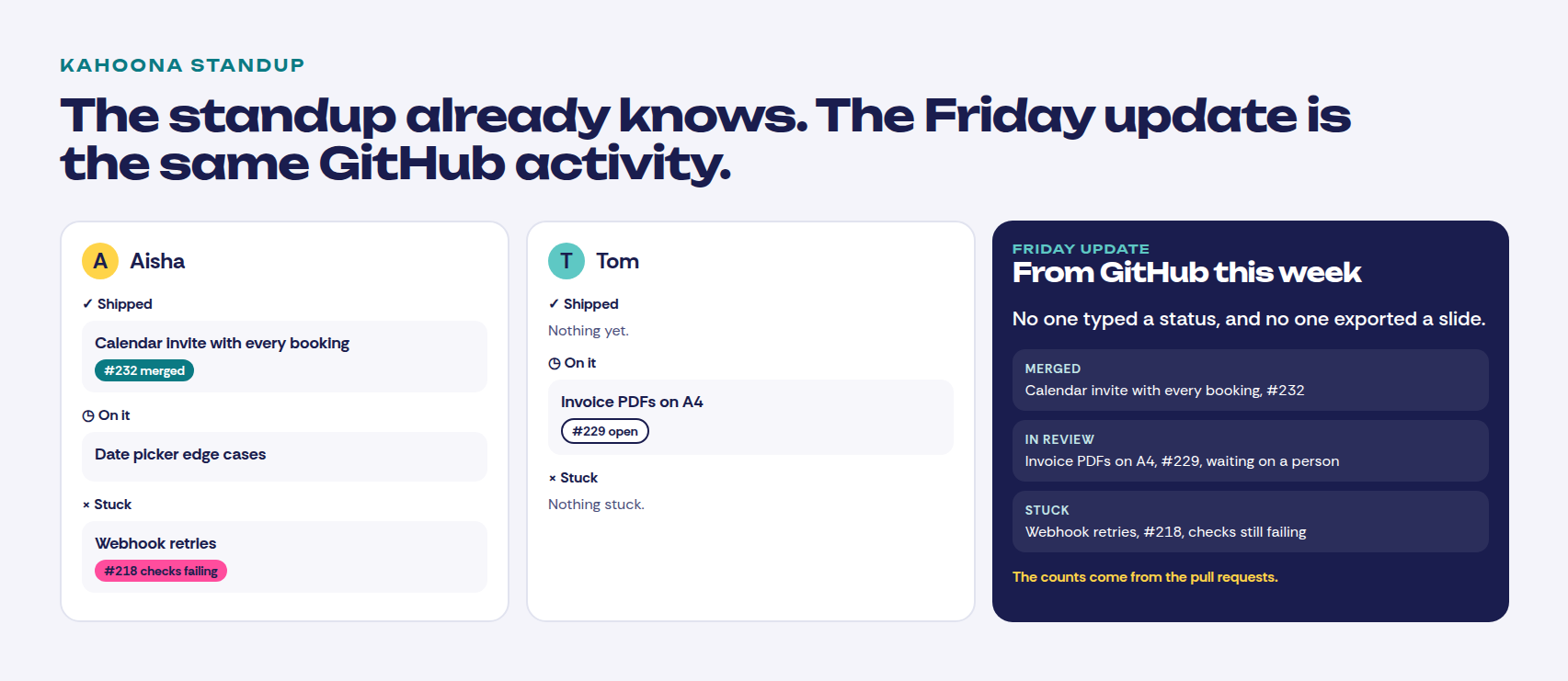
Who reviews those pull requests, and who should not, is the longer version in How to review AI agent pull requests without drowning. One owner on the card before an agent starts is in A Claude Code kanban board.
Jira AI agents
Jira does have AI agents. I am not going to pretend otherwise.
Atlassian's Jira Coding Agent runs on Standard or Premium, with AI features on, Rovo credits available, and GitHub Cloud or Bitbucket Cloud connected. You can turn on a setting that makes it push a branch and open a draft pull request. With that setting on, the doc says it creates the draft for the team to review and merge, and it does not merge the pull request. You, the person who started it, are listed as the pull request author. The same page says the Coding Agent does not connect to third-party data sources using MCP. Sessions expire after 7 days of inactivity.
Rovo credits come with paid Jira, pooled for the org: 25 per user per month on Standard, 70 on Premium, 150 on Enterprise. Free is not in that table. Turning Rovo on needs an org admin on a verified company domain. A gmail or outlook address does not qualify. Extra usage is listed at $0.01 per credit, and Atlassian says extra usage billing starts December 3, 2026. Basic Rovo agents are 10 credits per billable event. The Coding Agent is in the variable, premium bucket.
So a paid Jira site can already open a draft pull request. What I did not find is a standup and a Friday update that stay current from GitHub, or a client page that is a published snapshot and cannot see the live board. The thread above is people doing that status job themselves, with Claude, and exporting a PPT. Tbh that status deck is why the Friday update exists.
Kahoona's agents are the same shape on the merge rule. They open the pull request and stop. The difference is the board is that loop, not a credit meter you bolt a status deck onto.
Pricing
Checked October 28, 2026.
The dollar amounts are the new list prices effective October 13, 2026 PT, from Atlassian's cloud pricing tables. Plan limits are from Explore Jira Cloud plans and the Cloud licensing FAQ. Plan names are on Jira pricing. Kahoona's price is from kahoona.app.
Monthly Jira is progressive. For a small team every seat sits in the 1-100 tier, so the per-user price does not drop. Standard is $9.70 per user per month. Premium is $19.60. Enterprise is quote-only on the pages I checked. I am not going to invent a number for it.
Free is $0 for up to 10 users, with 2 GB of storage and community support. Atlassian says Free has no audit logs, limits permissions, roles and work-level security, limits email notifications, limits apps that extend Jira, and has no advanced roadmaps. It also says Free has no anonymous access, and that it can deactivate a Free site for inactivity. Go over 10 users and the billing contacts get a warning. After 7 days the site is upgraded to Standard unless the extra people are removed. Free is monthly only.
Automation on the plan page: 150 steps per subscription per month on Free, 400 per user on Standard, 750 per user on Premium, 1,000 per user on Enterprise.
| Kahoona | Jira | |
|---|---|---|
| AI agents | Hand an agent a card, get a GitHub pull request back | Rovo on paid plans. Jira Coding Agent on Standard or Premium can open a draft pull request |
| Who merges | Your team. Agents never merge | Coding Agent does not merge. You are listed as the pull request author |
| GitHub | Board, standup and Friday update stay current from GitHub | Coding Agent can target GitHub Cloud or Bitbucket Cloud |
| MCP | Claude, Cursor and other agents | Rovo MCP is documented for third-party tools. The Coding Agent doc says it does not use MCP |
| Client view | Published snapshots only, via Client Inbox and client pages | Free has no anonymous access |
| Free plan | Free for one person | Free, $0, up to 10 users, 2 GB, community support |
| Paid plans | First chair free, then $5 per extra chair per month, no card | Standard $9.70 per user per month for users 1-100. Premium $19.60. Enterprise is quote-only |
What five people would pay. This is our arithmetic from the published prices, not a quote. Jira Free for five people is $0, if you stay inside the 10-user cap and the Free limits. Jira Standard monthly is 5 × $9.70 = $48.50. Jira Premium monthly is 5 × $19.60 = $98. Kahoona keeps the first chair free and charges $5 for each extra chair, so five people is 4 × $5 = $20 a month.
At ten people, Jira Free is still $0, right on the cap. Standard monthly is 10 × $9.70 = $97. Premium monthly is 10 × $19.60 = $196. Kahoona is 9 × $5 = $45 a month.
Annual Jira is sold in fixed user tiers. The smallest Standard tier on that table is 10 users at $950 a year. Premium's 10-user tier is $1,950 a year. There is no 5-user annual price on the table, so I am not inventing one.
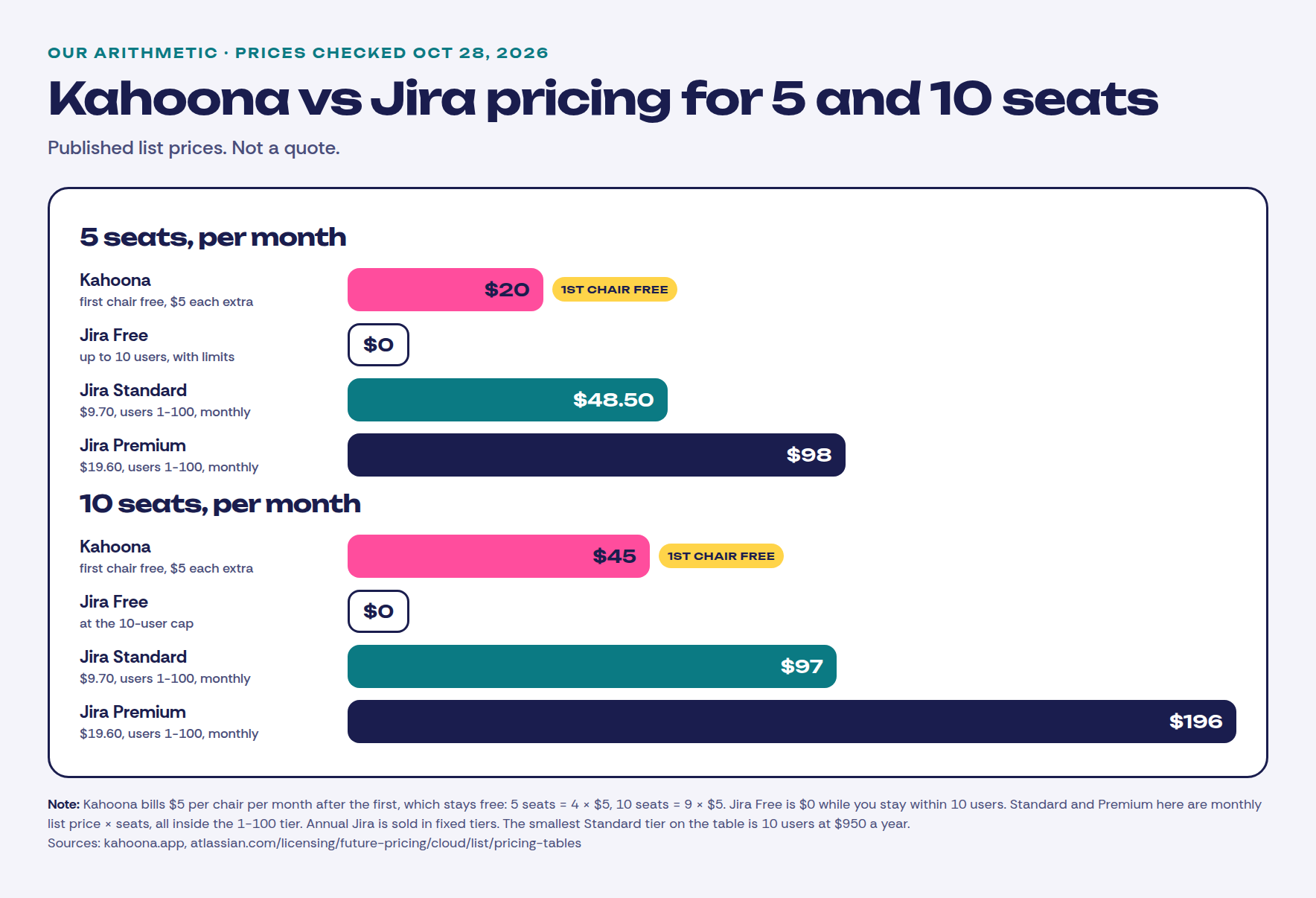
The free chair does not go away when the team starts paying. Jira Free is still the cheaper board if ten people fit inside it and you do not need the agent loop. A $20 versus $0 gap aint why I would switch a capstone. The workflow is.
When to pick Jira instead
Pick Jira if any of these are you:
- The company is large. Standard and Premium are documented up to 100,000 users, with audit logs, advanced permissions and paid support. Premium adds a 99.9% uptime SLA and unlimited storage. Kahoona is a web app for a dev team and its agents.
- You need complicated workflows and apps. Paid Jira is where advanced permissions, audit logs and apps that extend Jira live. Free limits those. If the Marketplace is the product you actually use, stay.
- You want $0 for up to 10 people and a coding agent is not the point. Jira Free covers a 3-person capstone. Kahoona's free plan is one person. Three people here is $10 a month, and that is the wrong buy if nobody is handing cards to an agent. GitHub Projects or Trello are also honest answers to that thread.
- You are already on Jira and the Coding Agent is enough. Standard or Premium, GitHub or Bitbucket connected, a draft pull request, a person merges. If the rest of the company lives in Jira, I would not move them for a board.
How to try both fairly
One repo, one week. In Jira, use Free if you are under 10 people and you only need a tracker. Use Standard if you want the Coding Agent, and notice whether the work list stays on the page while you add to it. In Kahoona, connect the same repo and hand a few small cards to an agent.
At the end of the week, look at who wrote the status, who merged the pull request, and what a client was allowed to see.
Also see: Kahoona vs GitHub Projects, Kahoona vs ClickUp, Kahoona vs Trello, and ClickUp vs Trello vs Kahoona.