How to manage multiple Claude Code sessions without watching them
Manage multiple Claude Code sessions without babysitting the spinners. Parallel AI coding agents leave questions and pull requests on one board, and blockers on the standup.
If you run several Claude Code or Cursor sessions at once, the work turns into finding which one is stuck. I don't want that job. I want every open question, blocker and finished pull request in one place, and I only step in for a real decision or a review.
If those sessions belong to a team, the short rules are in AI coding policy for teams, written short.
The workday turned into watching the spinner
I used to get stuck on a bug for an hour and then figure it out, and that was the best part of the job. Now I write a prompt, watch the little spinner, check Slack, come back, read what it did, and tell it what it got wrong.
I've started doing laundry between runs. I have never had cleaner clothes or felt less like a programmer.
Not giving it up, it's faster and I'd be slower without it. But does anyone else feel like they went from building things to babysitting something that builds things?
u/theflowerkeeper:
"does anyone else feel like they went from building things to babysitting something that builds things?"
Yup. One spinner, then you come back and read what it did. A few sessions of that and you are hopping terminals to find the one that is waiting on you.
I'm struggling to keep up and manage all of my chat sessions and not lose track of the bigger picture.
If a worktree needs to qa something in the browser or i really want to QA it in isolation myself i'll set up a whole dev env for just that worktree. I then want all the sessions to automatically autofix my reviews when changes are requested and auto-merge once approved (just like claude desktop sessions).
I use linear to try stay on top of the big picture but some work needs part 1 and part 2 style deployments where changes to the db schema get deployed first before the code changes it depends on and any other important pre-post deployment steps/blocking PR's.
I'm very tempted to build something that sits above all of that tedium to manage it for me and surface all questions each session has for me in one convenient place with a nice birds eye view of everything and all the deployment boundaries i need to be aware of. But that all seems like overkill, curious what strategies you all use...
u/vizouru already uses Linear to keep the big picture, and still wants this:
"I'm very tempted to build something that sits above all of that tedium to manage it for me and surface all questions each session has for me in one convenient place with a nice birds eye view of everything and all the deployment boundaries i need to be aware of."
That's the request. One place for the questions, and a view of the lot, without another terminal whose job is watching.
Write the handoff on the card
Each session gets a card before it starts. The description is the spec. On Kahoona, if that description is under 60 characters and the card is waiting to start, the card says "Add what done looks like. Agents do much better with a clear spec." Write what done looks like anyway. The hint is not a lock.
Comments on the card are the handoff notes. Decisions you already made, files to leave alone, the answer you don't want to retype into a prompt. When Kahoona's own agent starts, it reads the title, the description and the last 20 comments on the card. That text is untrusted card data, not instructions. Standing rules go in the repo's CLAUDE.md or WORKFLOW.md. The specifics of this job go on the card.
Kahoona does not read your Claude Code or Cursor terminal. Connect the session over MCP, give it the card id, and tell it to call get_task before it edits anything. If it needs a decision, tell it to call comment_on_task and stop. The comment sits on the card. You answer there. A comment from that session is not the same thing as Question for you. That chip is for a question Kahoona's own agent posts while it is running.
Two sessions you start yourself can still both begin an unassigned card. MCP has no claim lock. Assign the card, then point one session at that id. Who owns the next card, and the caps on Kahoona's own runs, are in A Claude Code kanban board: who owns the next task?.
Manage multiple Claude Code sessions from one board
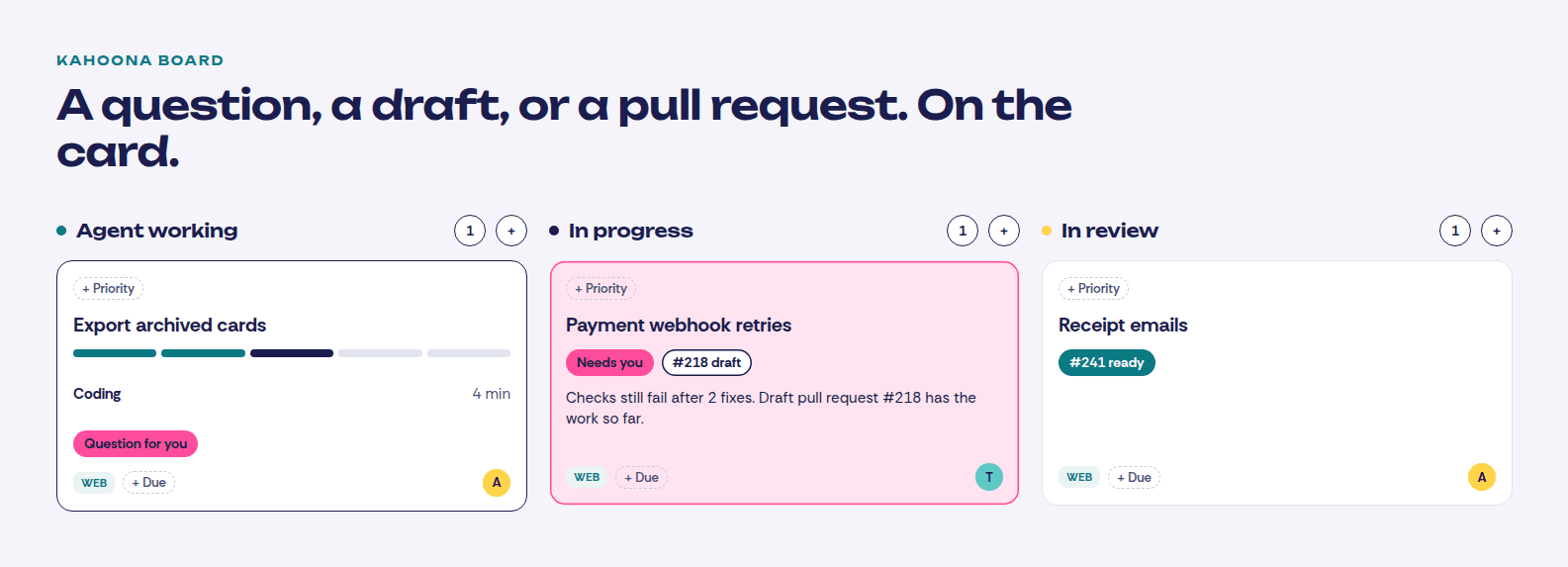
Kahoona's own agent is the session you don't watch. A project runs one of those cards at a time. The others wait as Next up or #2 in line. While it runs, the card shows the step, such as Coding or Running the checks. If the agent posts a question, the card says Question for you. The question text is on the card under Notes and replies, and the same question lands in notifications. You reply on the card. The reply reaches the agent on its next step, and the Question for you chip clears.
When the run stops and needs a person, the card says Needs you, with the reason, and it moves back to your in-progress column. Checks that still fail after two fixes leave a draft pull request. The card names the draft. A run that gets through moves the card to review and marks the pull request ready. Drag the card out of the agent lane and the run cancels. There is also a Cancel run button on the card.
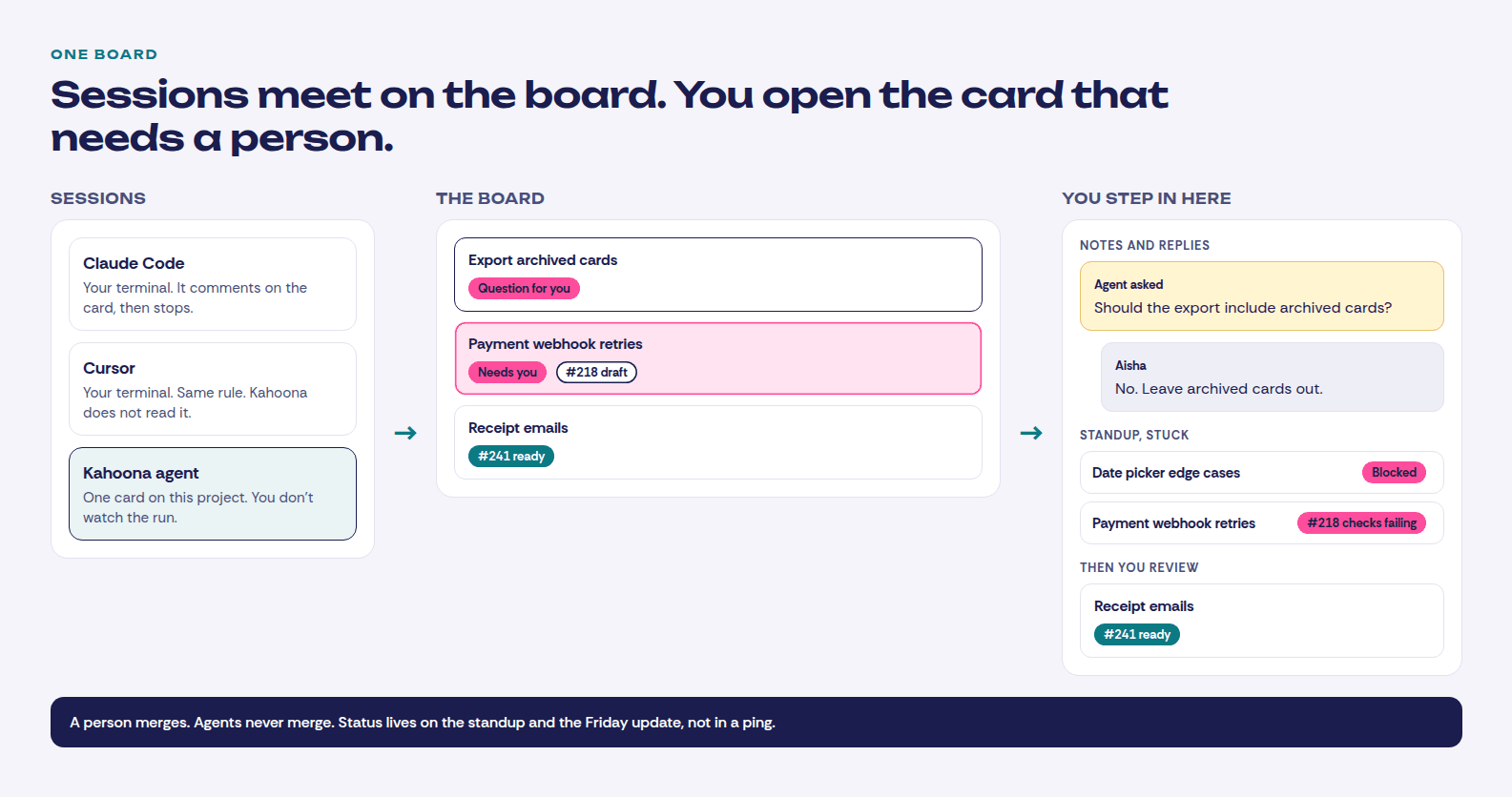
That is one Kahoona agent per project, not a pile of them. Parallel Claude Code and Cursor sessions are still your sessions. They share this board. Their question shows up if they comment. attach_commit links a commit to the card and does not move it.
Don't call it done because the agent said so
Proof first. Kahoona's agent runs the checks you configured and can try to fix a failure twice. If they still fail, the pull request stays a draft and the card is not done. I don't treat those checks as the merge gate. They run on the agent's own computer, on its own tree. GitHub's CI is the gate. Agents never merge, and they never deploy. Merging the pull request moves the card to Done.
An external session can call move_task. Don't tell it to mark the card done. Tell it to comment, link the commit, and leave the column alone.
I've been building with Claude Code for a few months: a 1982 home computer emulator, a phone app, a few websites. I don't write code. What made it work wasn't prompts, it was rules:
1. Nothing goes live until I write "merge". Every session works on its own branch.
2. Each project has a HANDOFF file. Every session ends by updating it, so the next one starts where the last stopped.
3. Before anything counts as done, I ask for proof I can see: a test result, a screenshot, a live link. Not "it works".
4. Every background process gets a hard time limit. I learned that after an agent left a video render running for 9 hours.
5. One "manager" session watches the others and keeps a log of my decisions, and checks they were actually carried out.
What rules have you ended up with?
u/gonenyarom keeps a manager session on top of the others:
"One "manager" session watches the others and keeps a log of my decisions, and checks they were actually carried out."
That's a fair setup if you want the log in a terminal. The HANDOFF file in that post is the same idea as the notes on the card, and asking for proof you can see is the right bar. The piece I don't want is another session whose job is watching. The check I trust is CI on the pull request, not a second model saying it looked. How I sort the reviews is in How to review AI agent pull requests without drowning.
Batch the progress and skip the status pings
Flamerix AI found something odd in its Claude Code bill: updates to the tiny background-agent status line accounted for 16.4% of its estimated API spend in one week. The main conversation accounted for 15.7%.
Why? About every 30 seconds, Claude Code was sending each background agent’s transcript to a model to get a fresh 3–5 word status update. In Flamerix’s data, nearly one in five API requests was for those summaries.
The team built a small workaround that stops the summary timer while leaving the agents running. In its Linux tests, five summary requests became zero. The catch: the status text stops updating, and a Claude Code update could break the workaround.
It’s a striking finding from one team’s measurements: a few words on screen can involve a lot of work behind the scenes.
Flamerix AI’s write-up and code
https://gist.github.com/flamerix-ai/c3905705cc4205e5de3011fa2e74efce
Eduardo Garza's post says Flamerix AI found that updates to the tiny background-agent status line accounted for 16.4% of its estimated API spend in one week. The same post says that about every 30 seconds, Claude Code was sending each background agent's transcript to a model for a fresh status line. That's their measurement, not mine.
I don't want that ping. The standup already groups the board by the person who owns the card. Shipped includes a merged pull request. On it is the open work. Stuck is a blocker that isn't finished, an open pull request whose checks are failing, or a card waiting on the client. You read that instead of asking each session where it is. The comment I want on the card, and the note I would send a client, is in A status update template for agents: BLUF, then SBAR.
The Friday update is the weekly digest on the GitHub tab. It groups the repo activity by week. The counts are already there. The first time you expand that week, Kahoona writes the paragraph from the GitHub activity already on the page. Over MCP, weekly_digest returns those counts and themes. That call does not write a new paragraph.
A nightly Jira run is a fair setup
Each day I review my Jira tickets for work that I think can be automated. If so, I add a specific label to the ticket. Each night, I have a scheduled workflow that scans my Jira tickets, looks for that label, creates a local worktree, and creates an implementation plan. If the ticket can be implemented by touching 3 or fewer files, not including new tests, it will go ahead and implement it and create a PR. If not, it stops after creating the plan.
After processing everything, it creates a report with the status of all the tickets. When I start my day, I review any PRs and address any issues. Then I review the plans of the tickets that couldn't be implemented. If I'm satisfied and it's still a smaller fix, I'll add a second label to the ticket. These will be picked up in a second nightly run, implemented, and have PRs created.
This has allowed me to focus on the more complex tasks during the day. Some I still have too many agents running, but this has been a major improvement .
@StacheAutonomy labels a Jira ticket during the day. The post says a nightly workflow then scans for that label, makes a local worktree and an implementation plan, and implements the ticket only when that means touching 3 or fewer files, not counting new tests. Otherwise it stops after the plan. The post says that helped, and that some days there are still too many agents running. If the company already lives in Jira, I would keep that. I compared the boards in Kahoona vs Jira.
Linear is the same kind of answer. u/vizouru is already using it for the big picture. If the tickets and the reviews live there and you can see the questions, keep it. I compared the boards in Kahoona vs Linear. The same "keep the board you already have" point for the other tools is here:
- Kahoona vs ClickUp
- Kahoona vs Trello
- Kahoona vs GitHub Projects
- ClickUp vs Trello vs Kahoona for small dev teams
GitHub Projects is the right board if you want it inside GitHub and you don't want another product in the middle. If those sessions were running in Conductor, the shutdown and where I would put the queue are in Conductor is winding down. Where to run your parallel coding agents next.
Where I use Kahoona is the loop. The card holds the spec and the comments, a question or a draft pull request shows on the card, and the standup and the Friday update come from the board and from GitHub. I build it, so weigh that.
Clients stay off this. A client page is a snapshot of what you chose to publish. The live board, the questions and the draft pull requests stay with the team.
Kahoona is free for one person. On a team the first chair stays free and each extra chair is $5 a month, so five people pay $20 and ten pay $45. No card needed.
One board. Questions on the cards, blockers on the standup, a person merges.