Let Claude Code and Codex pick up tickets from your board with MCP
A project management MCP server lets Claude Code, Codex, and Cursor pull a card from the board. Here is Kahoona's setup, the tools, and how a named pull request moves that card. A person merges.
I want Claude Code, Codex, or Cursor to pick up a ticket from the board. A bloated PM tool does not help, and an agent whose job is clicking through that tool does not either. A project management MCP server is the board, with tools the agent can call.
One place for the tasks
On r/projectmanagement, Debloated - Lite Project Management tool for an agency?:
"I had it enough with Notion and ClickUp. I just want to be able to see my tasks in one place, without all the bloat of AI and other functions."
They also asked for "MCP for taking tasks/tickets from Claude/Codex."
Yup. One list. And a way for Claude or Codex to take a card off it.
This is hilarious. Time to vibe code our own customized @clickup .
I don't even use half the features anymore. I loved Clickup 5 years ago. It was simple and had everything I needed.
It also used to cost $5/user/month, which is completely fine.
They already increased prices a few years ago. Now I'll end up paying almost $3k per year for what's essentially a kanban board with multiple view options.
I don't care about their Brain AI function, or any new feature they release.
The worst part is they gatekeep some simple as f*ck features behind the "business" plan, so downgrading isn't really an option.
"I don't even use half the features anymore."
Yup. He wants the simple ClickUp from five years ago, and he is talking about building his own. The price lines in that post are his. I have not checked ClickUp's pricing page today, so I am leaving them there.
On r/jira, Are Atlassian Devs paid by the click?, the OP wrote:
"Using agents to compensate for poor design isn't really a proper solution."
Yup. An agent that learns the extra clicks still has the extra clicks.
Connect the agent you already run
Kahoona's server is POST https://kahoona.app/mcp. One JSON-RPC request, one JSON response. The methods are initialize, tools/list, tools/call, and ping. There is no session to keep open.
Create the key in Settings, under API keys. The form starts on Read-only. Switch it to Read & write if the agent should comment, move a card, or link a commit. The raw key starts with kah_ and is shown once. Send it as Authorization: Bearer plus the key. A logged-in browser session is rejected. You can revoke the key, and the client loses access then.
A read-only key can list. The write tools are left off the list it gets back.
Claude Code, from a terminal. Replace kah_live_… with the key.
claude mcp add --transport http kahoona https://kahoona.app/mcp --header "Authorization: Bearer kah_live_…"
--scope user puts it on every repo. --scope project writes a shared .mcp.json.
Cursor MCP setup is one JSON file. ~/.cursor/mcp.json is global. .cursor/mcp.json is the one repo.
{
  "mcpServers": {
    "kahoona": {
      "url": "https://kahoona.app/mcp",
      "headers": { "Authorization": "Bearer kah_live_…" }
    }
  }
}
Codex reads ~/.codex/config.toml. The token stays in the environment, which is how the settings page writes it.
[mcp_servers.kahoona]
url = "https://kahoona.app/mcp"
bearer_token_env_var = "KAHOONA_TOKEN"
export KAHOONA_TOKEN="<YOUR_TOKEN>"
An older Codex that misses HTTP servers needs experimental_use_rmcp_client = true under [features] in that file, or an upgrade.
Claude Desktop's connector has no header field, so the settings page gives it an mcp-remote bridge. Claude Code, Cursor, and Codex use the URL directly.
Each key is capped at 600 calls a minute. One HTTP request can carry at most 20 JSON-RPC calls.
The same key also reaches project memory and whiteboards. Ask before you record a memory. A project can turn memory writes off, and then remember fails on purpose. This post is the task board.
Ask it for one card
Connecting the server does not hand the agent the next ticket. You tell it to call the tools. That call is the Claude Code MCP project board.
list_projects is the boards the key's user can see. Each one has the short key used in WEB-14.
get_board is the columns, in order, with a count. Call it before a move. A fresh board is Backlog, In progress, In review, Done. A renamed column comes back under its real label. Pass that id or that label.
list_tasks is the cards. Filter by column, by assignee user id, or by due window: overdue, today, or this week. Each card has its KEY-123 ref, title, description, status, priority, assignee id, and due date. The assignee is a user id.
get_task is one card, by id or by WEB-14. Same fields. The comment thread is not in the response. Write what done looks like in the description, because that is the text the agent gets.
Two sessions can both start an unassigned card. MCP has no claim lock. Assign the card, then give one agent that id. Who owns the next card is in A Claude Code kanban board: who owns the next task?. Several sessions on one board is How to manage multiple Claude Code sessions without watching them.
A write key can move_task, or update_task with a status, and the card actually moves. comment_on_task posts on the thread. attach_commit stores a SHA, a message, a url, and a repo on the card. It does not move the card. Calling it again with the same commit does nothing. create_task adds a card.
The line I give the agent is short. Call get_task on WEB-14 before you edit. If you need a decision, call comment_on_task and stop.
Name the card on the pull request
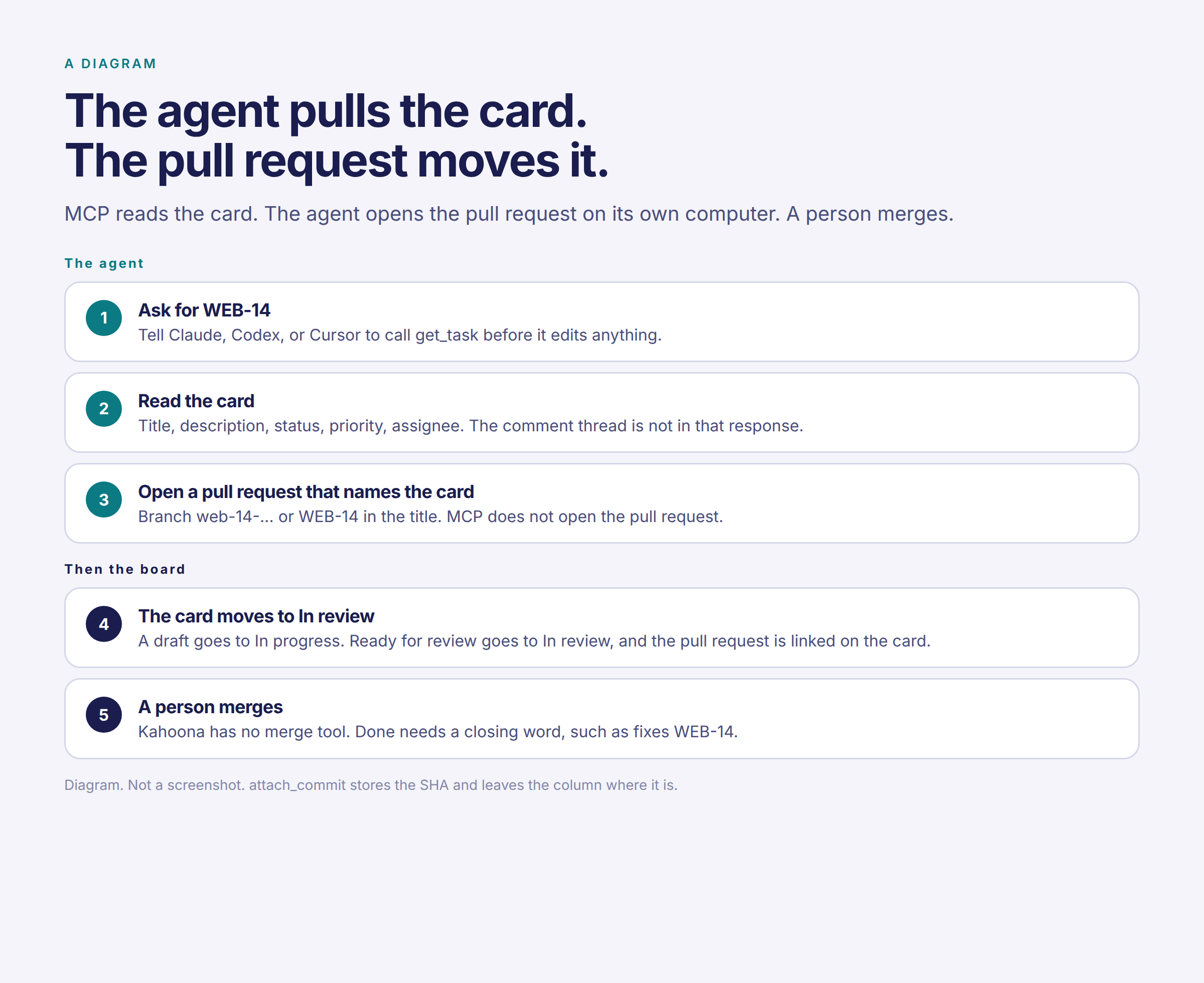
Claude, Codex, and Cursor open the pull request on the computer they are running on. The MCP server has no tool that opens a pull request, and no tool that merges one.
Connect the GitHub repo and a pull request that names the card can move it.
The branch has to lead with the ref. A slash prefix is fine. web-14-fix-login counts. feature/web-14-fix-login counts. fix-web-14 does not. WEB-14 in the title or the body counts too.
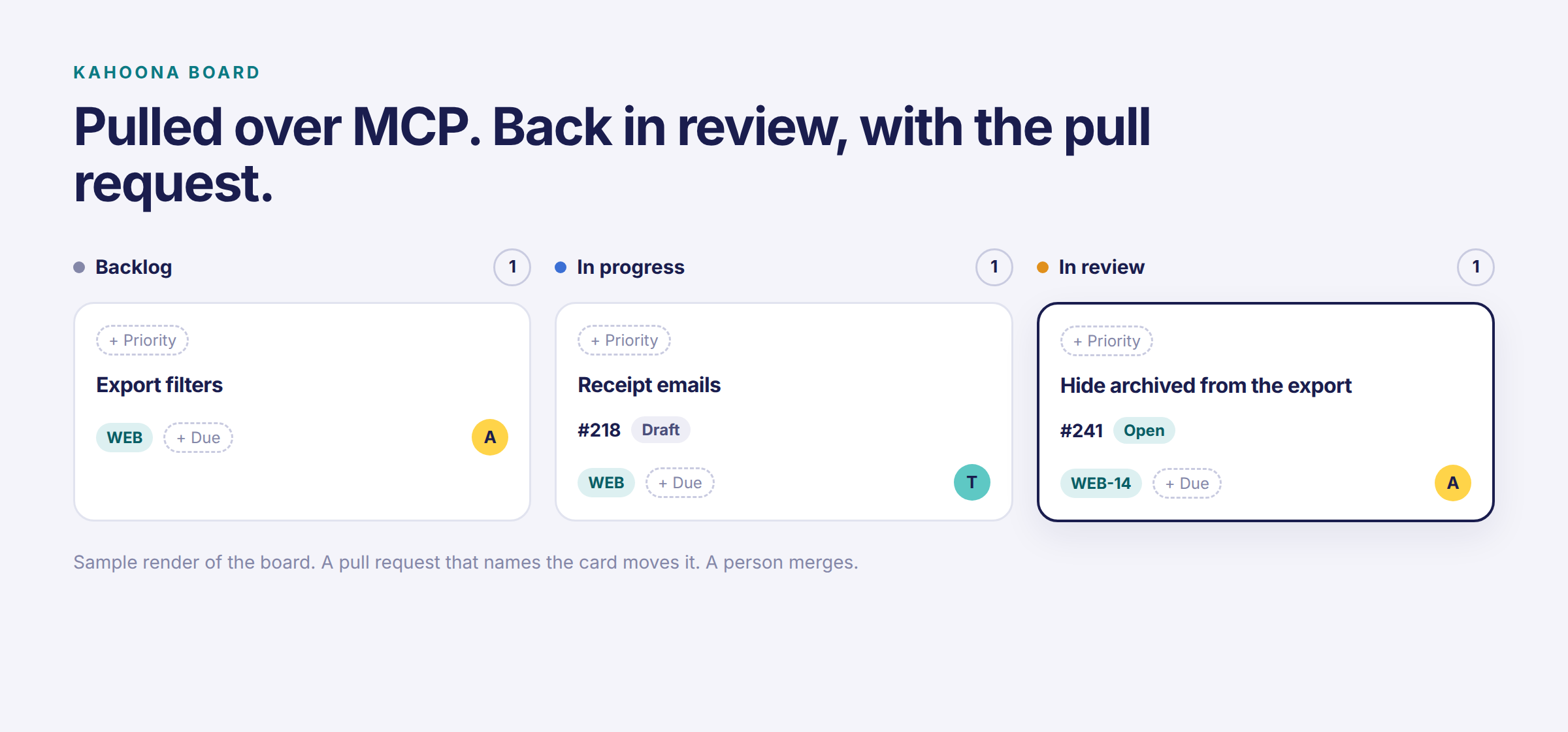
A draft that opens moves the card to In progress, on a default board. A pull request opened ready, or marked ready for review later, moves it to In review. The pull request is linked on the card, labeled Open or Draft.
A merge moves the card to Done when the title or body uses a closing word on that card, such as fixes WEB-14, closes WEB-14, or resolves WEB-14. The merge has to land on the branch the project watches. A mention with no closing word does not complete the card. The branch name on its own does not either.
Closing the pull request without merging files a suggestion to move the card back. The card stays where it is until someone accepts that.
The board walks a card forward. A ready pull request does not pull a card back from Done. If you or the agent moved the card after that GitHub event, your move stays.
A pull request sent by a GitHub bot does not move the card. That is a login ending in [bot] or -bot, and known automation logins such as dependabot.
attach_commit is still only the SHA on the card.
Kahoona's own agent is the other path. You hand it a card and it opens the pull request. It follows CLAUDE.md or WORKFLOW.md in the repo when one of those files is there. The MCP server does not send those files. Claude Code reads a CLAUDE.md that is already in the repo, because that is Claude Code. Standing rules go in that file. This job goes in the description.
Kahoona never merges. Kahoona's own agent never merges or deploys. A Claude, Codex, or Cursor session on your machine can still run git if you tell it to. A person merges. How I review that pull request is How to review AI agent pull requests without drowning.
One card for the agent and the person
On r/ClaudeCode, Has Claude Code changed how you plan tasks?:
"Do you write tasks for the agent first and the team second, or the other way around?"
One card. The description is the spec get_task returns, and the spec the reviewer checks. Agent-ready cards are clearer for people too. I don't keep a second copy for the team.
A ClickUp alternative is the smaller board
If the company already lives in ClickUp, stay there. I compared them in Kahoona vs ClickUp. Same call for Kahoona vs Jira and Kahoona vs Linear. GitHub Projects is the right board when you want it inside GitHub and you don't want another product. I compared them in Kahoona vs GitHub Projects.
I use Kahoona when the team and the agents share one board and the work comes back as a GitHub pull request. I built it, so weigh that. It is the wrong tool when the pull requests are somewhere other than GitHub, because that connection is what moves the card. It is the wrong tool when you want the agent to merge.
Kahoona is free for one person. On a team the first chair stays free and each extra chair is $5 a month, so five people pay $20 and ten pay $45. No card to start. It is a web app.
A card the agent can read, a pull request that names it, a person who merges.