Conductor is winding down. Where to run your parallel coding agents next
A Conductor alternative is the queue, not another local runner. Run multiple Claude Code agents in parallel in their own worktrees, and keep who is waiting and which pull request to review on one board.
Running agents in parallel is the easy part. Knowing who is changing what, which agent is waiting on a person, and which pull request needs review next is the hard part. Conductor is winding down. That coordination layer is what I would keep, wherever the agents move.
I am very excited to share that Conductor is joining Meta!
We have some big, crazy plans for the next interface. If you liked Conductor, you’re gonna love what’s coming.
We’re super excited to work with @natfriedman and @alexandr_wang at MSL to build it. They’ve been on an absolute tear, and I’m convinced MSL has the highest talent density of all the labs.
A huge thank you to our earliest believers @aaron_epstein, @ilyasu, and @nabeel. And to everyone here who tried Conductor, sent us feedback, and prompt requests - you made this so much fun. Thank you ❤️🚂
Choo choo!
Charlie Holtz posted that on November 4. The same news is on Conductor's announcement: "I have big news: Conductor is joining Meta."
I read the dates on that page on November 5. New sign-ups and downloads stopped on Wednesday, Nov 4. Existing free users cannot upgrade. People already on a pro plan keep the pro features for free.
Conductor Cloud goes read-only on Friday, Nov 13. You can still read old chats and export. You cannot send new messages. Active subscribers get a refund. It shuts down on Friday, Nov 20, and they begin deleting Conductor Cloud user data that day. Export before then. To move a cloud workspace and its chats onto a Mac, right-click it and choose Transfer to local. A full archive is under Settings, then Account, then Export data.
Local Conductor keeps getting new models and critical bug fixes until early 2027. The FAQ on that page says it will start winding down then.
Conductor's site describes the product as "a Mac app for running Claude Code, Codex, and Cursor agents in parallel across isolated workspaces." The longer description there says each workspace gets its own branch, git worktree, run environment, and shared context folder, and that you see what each agent is doing, then review and merge.
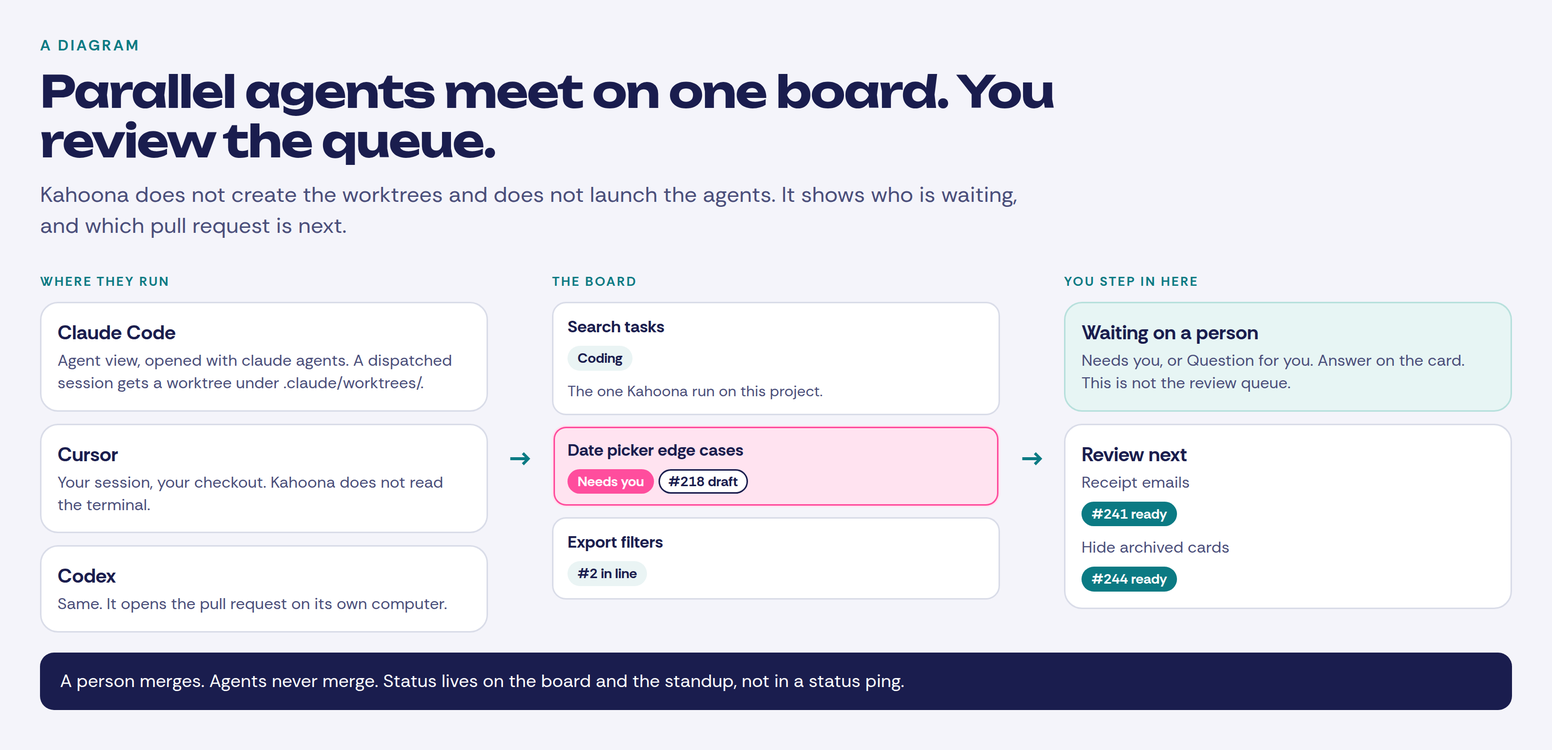
Kahoona is not a drop-in replacement for that app. It does not run on your Mac. It does not create workspaces or git worktrees. It does not launch Claude Code, Codex, or Cursor for you. It does not merge. It is a shared web board. A card goes to an agent. The work comes back as a GitHub pull request. A person on the team reviews it and merges.
Run multiple Claude Code agents in parallel
If local Conductor still fits, stay on it until early 2027. New people cannot download it.
Claude Code has its own screen for the sessions. Agent view opens with claude agents. The docs say: "Agent view is in research preview. The interface and keyboard shortcuts may change as the feature evolves." It is one list of background sessions, what is running, what needs your input, and what is done. Ready for review and Needs input sit above Working and Completed. A session moves to Ready for review when it has an open pull request that needs review or has failing checks.
A session you dispatch from that screen, or start with claude --bg, starts in your working directory. Before it edits files, Claude moves it into an isolated git worktree under .claude/worktrees/, so parallel sessions can read the same checkout and each write to their own. That is how you run multiple Claude Code agents in parallel without them saving over the same files. A session you already had open, and then sent to the background, keeps editing where it was. It does not get that worktree.
When that background session has changes in a worktree Claude entered, the docs say Claude commits without asking, and pushes the branch when the repo has a remote. It opens a draft pull request when the task calls for it. The same instructions say never push to main or master, never force-push, and never merge. If the task, CLAUDE.md, or memory says you handle git, Claude leaves it to you. This is Claude Code on your machine. It does not run Codex or Cursor, and the rest of the team is not looking at that terminal. The comparison with subagents and worktrees is in Run agents in parallel.
Git worktrees are the same isolation with no app around them. The git manual calls the command what it is: "Manage multiple working trees attached to the same repository." git worktree add checks out another branch in another directory. git-worktree. You still have to notice which tree is waiting on you.
On r/ClaudeCode, u/vinishkapoor, November 5, Conductor is winding down. I rebuilt its workflow with Claude Code’s own agent view, and here’s what maps across:
"The third conflicted, because two agents had changed the same addTask function"
They also wrote that they ran the sessions one after another, not all at once, checked the tests, and did not review the code. I am not treating that thread as a study. Separate checkouts still do not tell you that two agents edited the same function. Someone has to look before the merge.
Background subagents in Claude Code now use less of your usage limit.
A running subagent updates its status line every 30 seconds, and each update used to re-read its whole conversation. Now Haiku 5.5 writes it from short notes instead, so each update costs about 99% less.
That is Anthropic, the same day. A running subagent was updating its status line every 30 seconds by re-reading the whole conversation. They say Haiku 5.5 now writes the line from short notes, and that each update costs about 99% less. The 99% is their number. Cheaper status text is fine. It still does not say which pull request to read.
Which pull request to read next
If AI can write a pull request in 5 minutes, why does it still take 3 days to get reviewed?
What is actually slowing teams down?
The 5 minutes and the 3 days are his question. I have not measured them. The shape matches the queue I care about. Writing the pull request got fast. Getting it reviewed did not. How I check one of those pull requests is in AI code review vs verification: check the card, then the diff.
OpenAI's November 4 announcement says it will acquire Pierre Computer Company, to expand Codex's tools for building, understanding, and reviewing code. Trees and Diffs are already how the Codex app browses files and shows a change. Code Storage is the Git history service they plan to bring into Codex after closing. Closing still depends on the usual conditions, including regulatory approvals, and the companies stay separate until then. That is review and storage tooling. It is not a Conductor alternative, and it is not where a team runs a pile of agents. OpenAI's announcement.
A Conductor alternative is the board
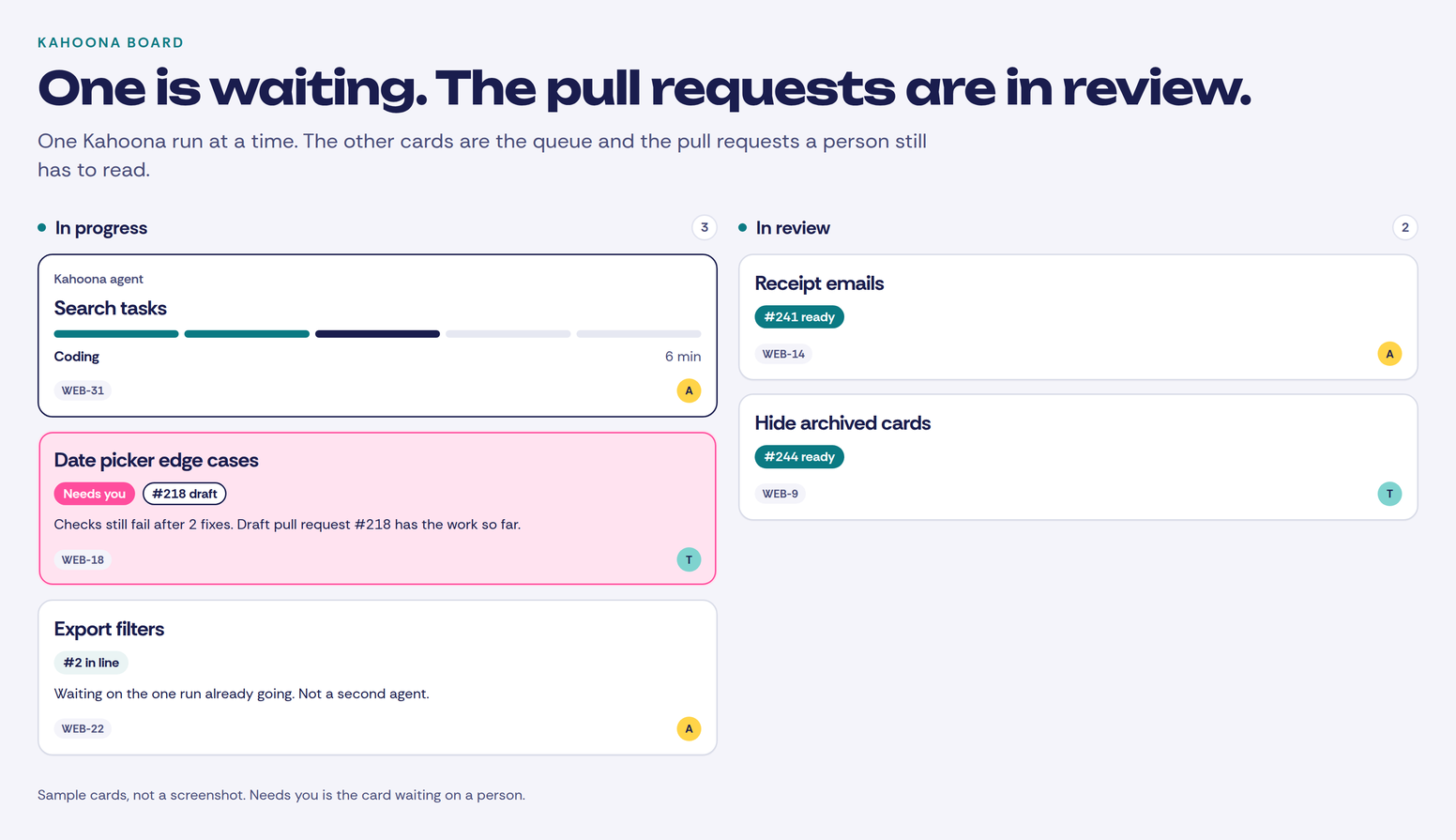
Each task is a card before it starts. The description is what done looks like. Comments hold the decisions you already made.
Kahoona's own agent runs one card on a project at a time. The cap is one run, maxConcurrentRuns set to 1. The others wait as Next up or #2 in line, on the team's own columns. There is no separate agent lane. While it runs, the card shows the step, such as Coding or Running the checks. A question during the run says Question for you. You answer on the card. If the run stops and a person has to take it, the card says Needs you, with the reason, and it moves to in progress unless the card was already further along. The card goes back to the person who asked. Checks that still fail after two fixes leave a draft pull request, and the card names the draft. A run that gets through moves the card to review and marks the pull request ready. The run has a Stop button. A person merges. The agent never merges and never deploys.
Sessions you start yourself are separate. Kahoona does not read a Claude Code, Cursor, or Codex terminal, and it does not create their worktrees. Connect the session over MCP, give it the card id, and tell it to call get_task before it edits. If it needs a decision, comment_on_task and stop. attach_commit stores the SHA and leaves the column alone. MCP has no claim lock, so two sessions can both start an unassigned card. Assign it, then point one session at that id.
Connect the GitHub repo and a pull request that names the card can move it. A draft moves the card to In progress. Ready for review moves it to In review, and the pull request is linked on the card. A merge moves it to Done when the title or body uses a closing word, such as fixes WEB-14, and the merge lands on the branch the project watches. A mention with no closing word does not finish the card. The branch has to lead with the ref, such as web-14-fix-login. The setup for Claude Code, Cursor, and Codex is in Let Claude Code and Codex pick up tickets from your board with MCP. Several sessions on one board, without watching the spinners, is in How to manage multiple Claude Code sessions without watching them.
The standup groups the board by whoever owns the card. Stuck is a blocker that is not finished, an open pull request whose checks are failing, or a card waiting on the client. The Friday update is the weekly digest of GitHub activity. Read those instead of polling each session.
Clients do not see this. A client page is a snapshot of what you published. The live board, the questions, and the draft pull requests stay with the team.
If the questions are already visible in Linear, stay there. I compared the boards in Kahoona vs Linear. If the company already lives in Jira, same answer, in Kahoona vs Jira. GitHub Projects is the right board when you want it inside GitHub and you do not want another product. That comparison is Kahoona vs GitHub Projects.
I use Kahoona when the team and the agents share one board and the work comes back as a pull request a person merges. I built it, so weigh that. It is the wrong tool when you want Conductor's job: isolated workspaces on a Mac, Claude Code and Codex and Cursor in those workspaces, and a merge from that app. It is also the wrong tool when you want the agent to merge.
Kahoona is free for one person. On a team the first chair stays free and each extra chair is $5 a month, so five people pay $20 and ten pay $45. No card to start. It is a web app.
The agents can keep running in local Conductor while it lasts, in Claude Code's agent view, or in worktrees you made yourself. The card should say who is waiting, and the pull request should be in review where a person can take it.